

AAAwSum Web Connections ~ Helpful Hints:
Changing your screen resolution to 800 x 600 or Higher (Windows95-98 version)
After you have read this report, please stop by the AAAwSum Web Connection ! We have several new sections including:
 AAAwSum etoys Connection NEW!!
AAAwSum Discounted Online Shopping NEW!!
AAAwSum Online Casino Gambling NEW!!
Or you can just stop by and browse the AAAwSum Web Connection for exciting Free Resources and Connections
The reason you will find sites stating a
resolution size is that the internet standard is 800 x 600 or higher. The reasoning behind
this is that with this resolution the images and layout of that specific site and most
sites will be of a much higher quality in images and enriched layout based on this
resolution standard. So to better view it, is to conform your operating system with a few
simple steps and to get the full rich content of each site.
Below is a step by step process to help you achieve this
task (with simple graphic & full text help).
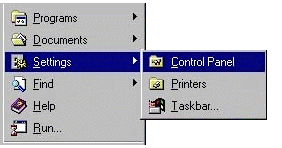
1. Move your mouse to the lower left portion of the screen and click the "Start"
button. Next, drag your mouse to the "Settings" menu. Then, select the
"Control Panel". Click there and your Control Panel window will open.
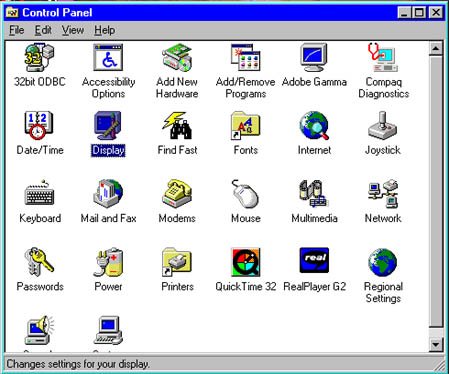
2. Move your mouse to the "Display" icon and double click on it.
3. The newly opened Display Preferences window provides several options for you. Click on
the tab
labeled "Settings".

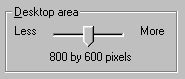
4. To increase the size of your desktop, click and drag the slider in the "Desktop
area" to "More". This will allow you to increase the standard 640 x 480
resolution to a higher mode. Most computers will let you select 800 x 600.
5. When you are done adjusting your settings, click the "Ok" button. Don't panic
now. Windows 95 will display a brief message notifying you of the change you have
requested. Simply agree with the change by clicking "Ok" again. Once the desktop
is resized, Windows 95 will ask you if you want to keep the new setting. Another click on
the "Ok" button will finalize the process. You will also be asked to
restart your computer for the new changes will take effect. Make sure that you are not
connected online when you restart your computer. This resolution will take a few minutes
getting used to if you've always had it set at a lower resolution, the font size will
decrease slightly however you will see websites more fully and the graphics will look much
better. The pages will fit the window, etc... This process will take approx. 2 minutes to
complete.
Notice: If you want to change your resolution back to it's original size, or to a larger
size, simply follow these same instructions.