Radiator
| Recording using codecs | Online discussion board | Frequently asked questions | Stations | Contribution |
 |
| (if you like Radiator and want to support its development) | |||||
|
Click some of the Google Ads and keep this free Radiator site running. Thank you :-) |
|||||
For listening to
and recording from popular radiocards: AimsLab RadioTrack, RadioTrack II, Reveal RA300,
SoundForte SF16 - FMP2, SoundForte SF16 - FMI, Aztech / Packard Bell, Comp -
Express, GemTek RadioCard, SoundForte SF16 - FMR2, SoundForte SF16 - FMD2, Zoltrix RadioPlus 108,
serial port adapters GemTek RadioMan, GemTek Wizard Radio, Justy Radion-maru, Unit
Rajikoma, AverMedia TV98 series
(BT878), GemTek FMRadio 21 USB, MediaForte SF64PCE2_02, MediaForte
SF64PCE2_03,
MediaForte SF64PCP, MediaForte M56VAP, MediaForte
SF256PCS, MediaForte SF256PCR, SoundForte SF16-FMR, SoundForte
SF16-FMX. Also works on D-Link USB radio DSB-R100 (see
below).
Should work on Windows XP, 2000, ME, NT, 98/95.
Plugins available for: AverMedia TVPhone 95, AverMedia TVPhone 98, AverMedia Phone 98 w/VCR, LifeView FlyVideo 98, Tekram M 205 PRO, Modular Technology MM100PCTV, Hauppauge WinTV Primio, SoundForte SF64-PCR, SoundForte SF64-PCE, ProVideo 951, AIMS Extreme, Askey TView99, Hauppauge WinTV, PixelView PV878P+, GemTek PCI (+ Guillemot 2000), SoundForte SF16-FMR, SoundForte SF16-FMR2, RadioTrack II.
DOWNLOAD - 2.22 MB incl. 30+ pages manual in PDF
(incl. English, Czech, Slovak, French, Italian, Hungarian, Brasilian Portuguese, Swedish, German, Turkish, Spanish, Slovenian, Russian, Romanian, Polish, Croatian, Serbian, Greek, Catalan, Bulgarian, Galician, Dutch, Norwegian, Estonian, Ukrainian,
Arabic, Danish, Belarussian, Lithuanian, Chinese (simplified and traditional), Albanian and Tatar languages)
If you did not find your language and want to help
others from your country, you can translate it yourself - IT'S
EASY :-) and send it to [email protected] - I will post it here for others to
download. Thank you. You will find more information in zip file.
|
Version 1.8.0.7 (25/08/2003)
Version 1.8.0.6 (17/07/2003)
Version 1.8.0.5 (09/07/2003)
Version 1.8.0.4 (01/07/2003) - possibility to append ID3 tag info to recordings Version 1.8.0.3 (28/06/2003) - flat state pagecontrol, script editor improvement, XP enhancement, added support for start and stop recording notification, menu font colors, plugin info button 02/04/2003 - new installer, added Albanian language by Mithat
Sadiku, GemTek / DLink USB drivers (.inf files) are now included, plugin for Philips saa7130/7134-based TV-tuners with FM-support by Andrey Zolotarev built on base LifeView reference design LR138.
13/01/2003 - added alternative plugin (direct port access) for ProVideo 951 by Marek Ingr 11/09/2002 - added XP Installation file for PCI Radio Gemtek card correcting a problem with sleep/suspend/hibernation mode in Windows XP. More info in GemTek PCI XP modified driver.txt file. 23/05/2002 - added simplified Chinese language by
Yang Qingdong, updated 08/04/2002 - updated rtcontrol.exe for global hot-keys control (for instance Win key support added) 26/02/2002 - updated GemTek PCI direct port access plugin by Alex Brukhoff 25/02/2002 - supports also Guillemot Maxi FM radio 2000 (via GemTek PCI Radio Card plugin - pciradio.dll). Discovered by Demonoid Prod. 24/01/2002 - added Chinese (traditional) translation by J. Leung 18/01/2002 - added GemTek PCI direct port access plugin by Alex Brukhoff 10/12/2001 - added Lithuanian translation by Gintaras Bielskis Version 1.8.0.2 (07/11/2001)
Version 1.8.0.1 (04/11/2001)
|
|
What is Radiator:
Radiator is freeware, plugins accepting program for listening to and recording from popular radiocards AimsLab RadioTrack, RadioTrack II, Reveal RA300, SoundForte SF 16 FMP2, SoundForte SF16 - FMI, Aztech / Packard Bell, Comp - Express, GemTek RadioCard, SoundForte SF16 - FMR2, SoundForte SF16 - FMD2, Zoltrix RadioPlus 108, for serial port adapters GemTek RadioMan, GemTek Wizard Radio, Justy Radion-maru, Unit Rajikoma, AverMedia TV98 series (BT878), GemTek FMRadio 21 USB, SoundForte SF256-PCx Xtreme, SoundForte SF16-FMR, SoundForte SF16-FMX, DLINK USB radio DSB-R100 and more cards supported by plugins. Its look was inspired by ATI Multimedia Center - software shipped with ATI cards. It offers you: intuitive use, support of all key operations by hot keys, possibility to record in various sound quality using codecs including MP3 and WMA, mouse use include wheel, optional tray icon view, easy-to-use frequency editing and sorting stations, direct keyboard tuning, command-line switches, language modules support, ATI MMC integration, large range of languages etc. ...
If you want you can link this page by using this icon:

just copy and paste this HTML code into your WEB page:
<a href="http://flesko.cz"><img border="0" src="http://flesko.cz/radani.gif" alt="Radiator - the FREE definitive radio player" width="88" height="30"></a>
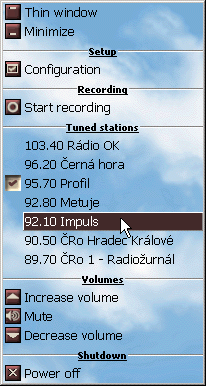
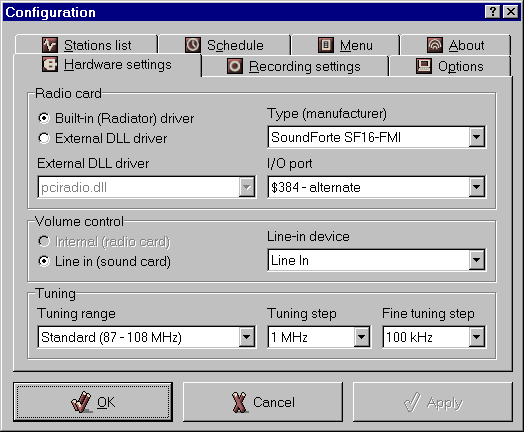
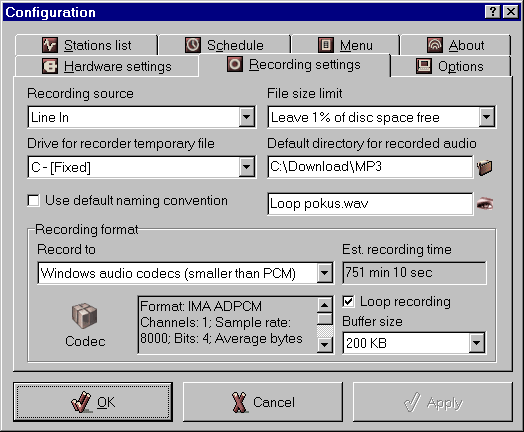
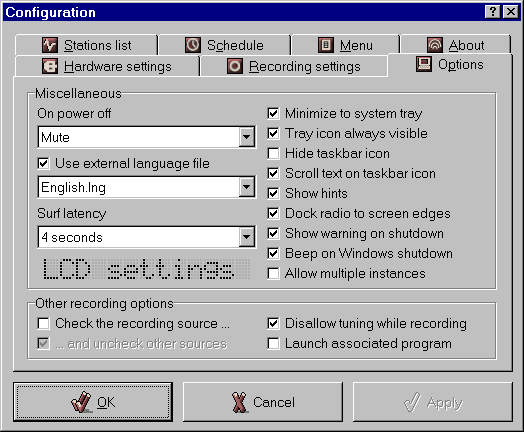
How it looks:
|
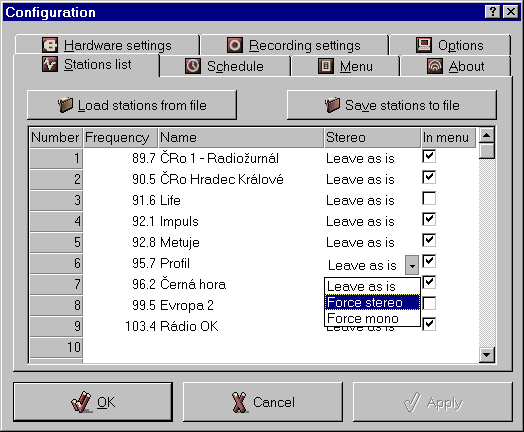
Hardware |
Recording | Options | Stations |
|
|
|
|
|
|
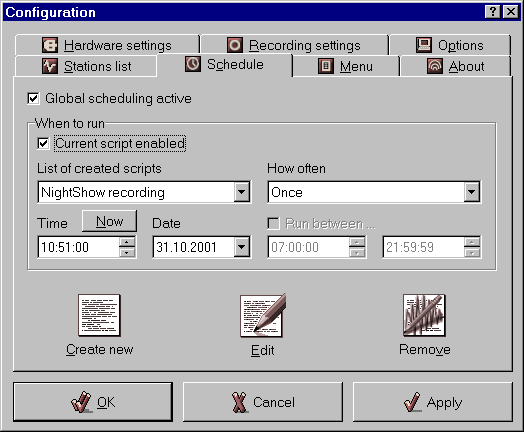
Schedule |
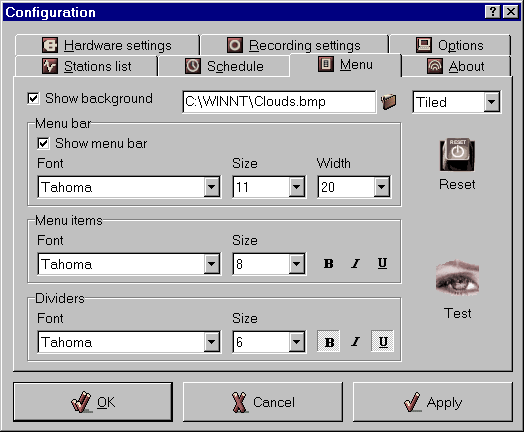
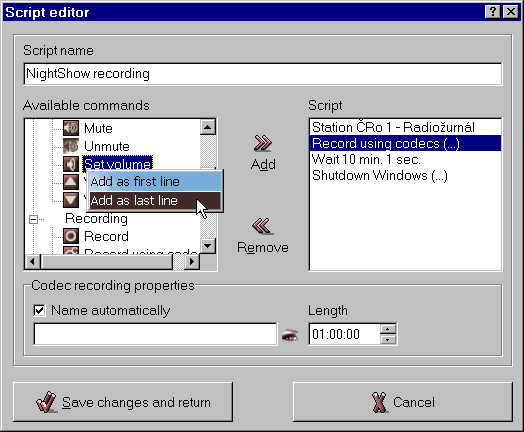
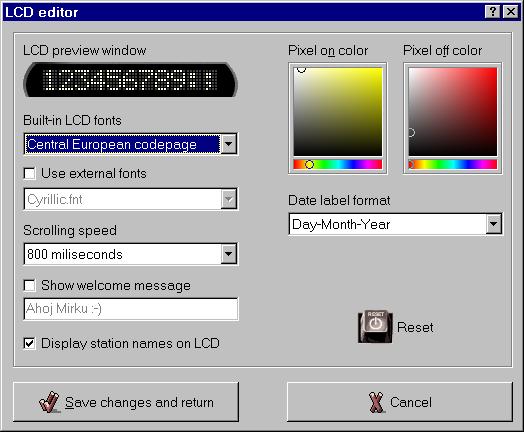
Menu | Script editor | LCD editor |
|
|
|
|
|
How to use it:
To install: Close Radiator if you are running it.
Run setup.exe and choose Install.
To uninstall - go to Control panels - Add or remove programs or use Uninstall
shortcut in Radiator group.
Prefferred way of using Radiator:
Preferred method of using Radiator is: run it on Windows start by copying its shortcut with parameter –thin -mute to Windows Startup folder. It will start it on every Windows start muted and as thin panel.
|
Hot keys: M, Space, * ... mute/unmute |
Mouse
operations:
mouse wheel up ... increase volume Radiator label: right click ... tray icon menu Station numbers: right click ... stations menu Sleep timer button: left click ... start/stop sleep timer Thin LCD label: switching between station and date-time modes Time LCD label in full window: if recording, left click switches view mode,
right click popups the menu; Frequency LCD label in full
window: left click shows the frequency for current station |
| Command-line
switches:
-tray ... run in tray right button ... menu |
Direct
tuning using numerical keypad:
press 1 or 6, 7, 8 or 9 (1xx or 6x, 7x, 8x or 9x MHz) and
press other numbers. |
Version 1.8.0.0 (01/11/2001)
loop recording - automatic recording of last minutes into buffer with defined length/size - no more missing beginnings of songs (Ctrl + L)
redesigned main window to be more synoptic
new button "Save and name automatically" (Ctrl + A)
redefineable filename mask (incl. extension)
possibility to use variables in filenames (also in scripts) with filtering of not allowed characters
possibility to choose stations that will not be shown in menu
added Recording menu item
essentially enhanced support of controlling via messages, added small command-line application (its source code is available for download)
added application for controlling Radiator via Windows global hot-keys
hardware scanning support for SoundForte Xtreme family cards
added 48x48 icon ;-)
possibility to tune really wihout limits (if allowed by hardware and driver)
- insert key No limit=1 into section [Settings] of
radiator.ini
VERSION NOTES:
04/10/2001 - updated ProVideo 951 plugin
Version 1.7.0.1 (01/10/2001) - fixed incorrect procedure causing unmuting and restoring the main window when clicking the tray icon and displaying the menu
Version 1.7.0.0 (30/09/2001)
added small command-line utility for controlling Radiator (source here)
importing and exporting stations from/to external file
each station can have its own stereo preference (leave as-is, force stereo,
force mono)
possibility to set surf latency time
menu bitmap background support
custom date label format
better looking color picker
Esc key now also stops surfing
corrected and improved remote controlling by messages (sample application with source is available for download)
other minor enhancements
13/09/2001 - added RadioTrack II plugin with possibility to switch mono/stereo by Josef Kucera
04/09/2001 - added Belarussian translation by Andrey Lagatsky
31/07/2001 - added SoundForte SF64-PCE plugin by Peter Klyushkin
20/07/2001 - added Danish language by Eric B. Hansen
08/07/2001 - actualized SoundForte SF64-PCR plugin, added SF16-FMR2 plugin
04/06/2001 - added SoundForte SF16-FMR plugin with many enhancements
02/06/2001
added GemTek PCI plugin
added French part of help by Denis Astorg
25/05/2001 - added help file in .chm format
19/05/2001 - added ProVideo 951 plugin
3/05/2001 - installation package contains plugins for AverMedia TVPhone 95, AverMedia TVPhone 98, AverMedia Phone 98 w/VCR, FlyVideo 98, Tekram M 205 PRO, Modular Technology MM100PCTV, Hauppauge WinTV Primio, SoundForte SF64-PCR
Version 1.6.1.0 (10/05/2001)
extended possible frequency range to 60 - 160 Mhz (Russian customers ;-)
support for ScanStation plugin function
new installation program based on NSIS allowing more powerfull installations
date picker in Schedule page now shows calendar after clicking on it
when closing Radiator it will no longer ask whether mute or leave when already muted
other minor improvements
Version 1.6.0.0 (28/04/2001)
added Radiator plugins support which will allow developers write plugins
for their card
added possibility to leave tray icon always visible
added possibility to set volume of sound device or set muted/selected state
to the Script editor
enhanced range of tuning step and fine tuning step
27/12/2000 - added Arabic language by Khalil A. Hanbali
10/12/2000 - added Ukrainian translation by Vladimir Michaylov
15/11/2000 - added Estonian language file by Aare Vesi
04/11/2000 - added Dutch translation made by Ane Duijff and Norwegian one by Gjermund Haugestol
31/10/2000 - added Galician translation by Santiago F. - galego21.org
22/10/2000 - added Bulgarian translation by Tihomir Mileshky
18/10/2000 - added Catalan translation by Univers Bertrana
Version 1.5.4.0 (16/10/2000)
added possibility to tune using mouse wheel (Shift + mouse wheel ... tune, Ctrl + mouse wheel ... fine tune, Alt + mouse wheel ... stations switching)
added possibility to close Radiator or shutdown Windows without showing warning box
length of recording in Script editor is now always shown in hh:mm:ss style
minor correction of SoundForte SF16 - FMR internal volume setting
D-Link USB radio DSB-R100 is reported by Phil to be working perfectly - it is necessary to:
download drivers for GemTek FMRadio 21 USB (23 kB) on http://flesko.cz/download/usbradio.zip
uninstall original software
connect radio to another USB port to force Windows to detect it again
then, when Windows recognize the new hardware on the different port, just install usbradio.sys driver
select GemTek FMRadio 21 USB in Radiator options
Version 1.5.3.0 (10/10/2000)
support for SoundForte SF16 - FMR and SoundForte SF16 - FMX (scanning does not work yet)
corrected Aztech internal volume setting
corrected script Run on weekend setting
Version 1.5.1.0 (30/09/2000)
added possibility to switch mono/stereo on Aztech/Packard Bell
corrected mono/stereo setting on SoundForte SF256-PCP QuadXtreme
script can be now run even in "night" range (for ex. between 22:00 and 5:00)
added option to run scripts only on odd or even weeks
(Note: The week number is calculated as stated in ISO standard 8601 - the first week of a year is the one which includes the first Thursday of the year - or in other words - the first week of a year is the week that has the majority of its days in the new year) - for ex. the 1st week in 2000 begins on January 3rd, January 1st and 2nd belong to the 52nd week of 1999)
:-)))
minor enhancements (tray menu popups on right click on entire form etc.)
Version 1.5.0.0 (23/09/2000)
new installer and deinstaller
new shortcuts D and U (down & up)
support for external LCD fonts, added Cyrillic font
added possibility to record on-the-fly using Windows built-in codecs
ATTENTION: Recording using certain types of codecs (MP3 etc.) on computers
powered by non-MMX slower processors could lead to system halt. Certain combinations of codec and
its parameters could be incorrect (for example max. bitrate of DivX :-) is in its current version limited to 64kbit/s).
It is advisable to make a short record and try to play it in WinAmp for ex. If you can hear anything it is OK :-)
support for GemTek FMRadio 21 (USB) - works on Win2000, WinME a Win98 (where is USB port supported) - just install USB radio driver
(usbradio.sys) - separate download here
(23 kB)
support for SoundForte SF256-PCP QuadXtreme
and SF256-PCS Xtreme Theater 5.1
(Note: Choose SoundForte
SF256-PCx X-treme setting in Radiator configuration for any
SF64/256 xxx card)
Since version 1.8.0.1 Radiator uses its own driver for SF 256/64 based
cards, so preceding installation of RadioAktiv should not be required anymore
(restart is necessary in most cases when driver is not installed yet).
The following text is no longer valid:
It is necessary to install drivers from www.mediaforte.com.sg
for the soundcard itself and then MediaForte radio software for it
(RadioActive). Version 4.00 is tested.
As soon as radio start work on original software the Radiator should work
also.
Radiator uses MediaForte driver located in system folders, so do NOT uninstall
RadioActive. If you want you can delete folder where it is located (C:\PCIRADIO by default) and links in Start menu, but files in system folders should not be deleted. Scanning does not work
yet..
Version 1.4.1.3 (08/09/2000)
added alternative port (284h) for SoundForte SF16 - FMD2
Version 1.4.1.2 (04/09/2000):
improved docking to be much more smoother (based on tip by Tan Tze Yong)
06/09/2000 - added Greek language by Nikolas Galanis
Version 1.4.1.0 (01/09/2000):
added support for Zoltrix RadioPlus 108, serial port adapters GemTek RadioMan, GemTek Wizard Radio, Justy Radion-maru, Unit Rajikoma and AverMedia TV98 series (BT878) (AverMedia TV98 only on Windows 9x)
added force mono/stereo button (useful with cards which supports it)
added new shortcuts for switching time/station mode of small LCD and for force mono/stereo
28/08/2000 - some changes and corrections in Spanish file made by just4fun
Version 1.4.0.1 (11/08/2000):
added support for RadioTrack II, Reveal RA300, SoundForte SF16 - FMI,
Aztech / Packard Bell, Comp - Express, GemTek, SoundForte SF16 - FMR2
SoundForte SF16 - FMD2
hiding/showing taskbar icon
scrolling text on taskbar icon
new setup program with possibility to select installation directory
fixed bug when maximizing from tray icon after -tray command
showing name of the station on hints of "Next station" and "Previous station" buttons
showing stations on LCD could be turned off (useful for Russia)
customization of LCD colors and scrolling speed
allowing (and disallowing) more instances of Radiator running at the same time
corrected code page table for ASCII mode to correctly display Swedish characters
06/08/2000 - added Serbian translation by Vladimir Curcic
02/08/2000 - added Croatian translation by Tumbri Brothers
31/07/2000 - added Polish language by Tom Hofman
28/07/2000 - added Russian translation by Alexey Hakimzyanov
(thanks also to Dima Zub who sended it few minutes later :-)
- added Romanian translation by Radu Swider
03/07/2000 - added Slovenian translation (Robert Galle)
21/06/2000 - added Spanish translation (Claudio F. Galluccio)
03/06/2000 - added Turkish language (Murat Gundogdu)
06/05/2000 - added Swedish (Crispin Dickson) and German (Thorsten Stroeher) languages
16/04/2000 - added Brasilian Portuguese language by Eduardo Brandao do Nascimento
Version 1.3.0.1 (01/04/2000)
now runs on any Windows NT platform incl. Windows 2000
script editor with large possibilities (incl. scheduling of:
recording in selectable quality, tuning by frequency, by number or by name, volume adjusting, muting/unmuting, launching other programs, posting messages,
beeping in various kinds and more ...)
repeatable scheduling: running once, hourly, daily, ..., on mondays, ... on weekdays ...., only between ... and ...
can run as thin window which is so small (and nice ;-) it can be on screen all the time
new improved design
sleep and Windows shutdown timer directly from display
new hot keys (Ctrl+F, Ctrl+C, Ctrl+G)
new command-line switches
responding to Radiator's own windows messages
and more ...
26/02/2000 - added Italian language by Fabrizio and Hungarian by DEZMO
25/02/2000 - added French language file by Denis Astorg
Version
1.2.0.3 (12/02/2000)
- slightly optimized source code
Version
1.2.0.2 (10/02/2000)
- little speed improvement
- new hot-keys * a Ctrl+T
Version 1.2.0.0
(06/02/2000)
- possibility to disallow switching frequency while recording
- tray menu customization
- added Slovak language file (thanks to TomBart, Slovakia)
Version 1.1.0.0 (30/01/2000)
- language switching support
- Czech and English modules
- Microsoft IntelliMouse wheel support
Visitors since 14/02/1999
Statistics for the 1st year
Made in Czech Republic. © 1999 - 2004 Miroslav Flesko
Any comments and suggestions: [email protected]
Main site on flesko.cz / Mirror on
FortuneCity
Last updated: 09/04/04 11:41