There are times when you might want to use a font that is not installed on your computer. There is a really easy way to do this without having to install the font to your Windows Font directory.  |
|||
To use a font
that is inside a Zip file.
1.) Go to the directory or disk that contains the zipped TTF and double click on the .ttf filename or the zip file icon that appears next to the name. 2.) If you have a program such as Winzip, or Helix Zip Manager installed, it will open up automatically. Once your program has been opened double click on the .ttf file name you see there. 3.) This will open up a view window of the font such as the one displayed on the right. 4.) Hit the - |
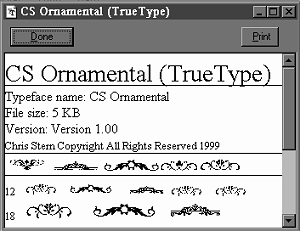
NOTE: If the True Type Font is not in a zip file, but not yet installed in the Windows Font Directory, just follow steps 2 to 4.
|
||
 Back
to Tutorials Menu
Back
to Tutorials Menu  All content on this page was created by and is the property of Chris Stern. Any inquiries or comments about this page can be sent to Chris at CS Designs Chris Stern / CS Designs © Copyright All Rights Reserved 1997 / 1998 / 1999 |
|||

 at the top right hand corner of your font view to minimize it to your Windows
Tray. As long as this font remains minimized on your Windows tray, this
font will be available to any application that utilizes fonts. Including
PSP.
at the top right hand corner of your font view to minimize it to your Windows
Tray. As long as this font remains minimized on your Windows tray, this
font will be available to any application that utilizes fonts. Including
PSP.