How To Connect
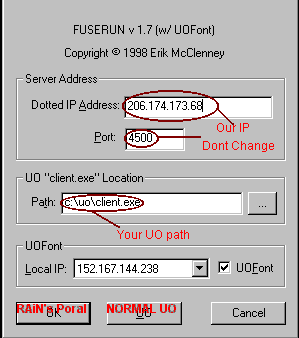
Before you attempt to connect to our server we would like for you to read up on how to connect. If you haven't read this yet that don't bitch about not being able to connect. If you had read this then by all means bitch away :) I have included a example fuserun thing for you.
Now boys and girls, pay attention. First of all make sure the server is up and you get our IP address. It's a good idea to copy it to the clipboard. You will need to check the web page each time you want to connect. This way you will get the freshest IP address. Leave the port alone! you don't need to screw with it. The UO client thing is important. You need to set it to your UO path and point it to the file "client.exe". Leave the local IP address alone. Click UOfont is you desire. Then click on OK not UO. Your userid on RAiN's Portal is Case sensitive. For example TYBAL does not equal TyBaL or tybal. Got it?
We have been getting a lot of pissed off people that say they can't go back to normal UO. People listen up. To get back to regular UO just run FUSERUN and click on the UO button. That is all there is to. After that UO button is clicked it restores the login.cfg so you can logon to the OSI servers.
Well, that should cover it all. Have fun.