
Name : ELLERY WEE EU TUAN.
Programme: Business Information Technology.
Course: CSC360 Computer Communications.
Lecturer: Shanmuga Sundram Samy.
Period :September 2 to December 13 1997.
Security on the internet has always been a major issue of many organizations either private,
government or non-profit organizations. Security is very important especially when the trend of
electronic commerce is more widespread these days. More and more companies whether big or
small has join in the bandwagon and have begun buying the appropriate software and hardware
required to enable a high level of security for the implementation of their on-line product sales.The
threat of a hacker is always imminent because of the damages cause by them. Besides that
communication through the net is always insecure without the proper encryption methods as the
TCP/IP mode of information transfer was not design with security in mind. Packet sniffing or IP
spooling could be easily done with the right software and hardware to get credit card numbers,
important corporate decisions including military secrets which will
be costly when intercepted.
This report will highlight the ways of securing communications on
the internet via
many ways such as encryption or cryptography, Secure Socket Layers , Secure Hypertext
Mark-up Language protection and securing networks internally. In the following report, the
methods, terminology and description will be in the easiest form possible to enable end users and
technology knowledgeable people to further understand the concepts and applications of these
various security methods.
Encryption
Encryption is a way of making information or communication secure through the means of changing
ordinary text to cypher text. Encryption technology has enabled many organizations and common
folk to send e-mail and other private messages safely. Most encryption technology involves using
private keys, public keys, secret keys, hash functions and digital certificates to achieve a degree of
authentication, integrity, confidentiality and a basis for non denial of the information interchanged
involved.
Cryptography comprises a family of technologies that include the following:
Encryption transforms
data into some unreadable form to ensure privacy. Internet communication is like sending postcards
in that anyone who is interested can read a particular message; encryption offers the digital
equivalent of a sealed envelope. Decryption is the reverse of encryption; it transforms encrypted
data back into the original, intelligible form. Authentication identifies an entity such as an individual, a
machine on the network, or an organization. Digital signatures bind a document to the possessor of a
particular key and are the digital equivalent of paper signatures. Signature verification is the inverse
of a digital signature; it verifies that a particular signature is valid.
The way encryption works is like this...each sender and the recipient has a private key
known only to him/her and a public key which is known by anybody. Each time the decryption
process occurs that is changing the cypher text to plain text, at private key and public key is involved
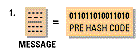
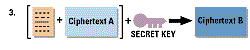
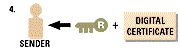
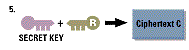
and must be from the same party. A simple example of encryption process
can be viewed below:-

The decryption process occurs in the reverse process:-

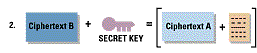
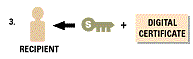
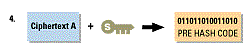
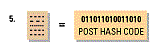
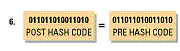
6.The post hash code equals the pre hash code. This verifies that the message has not been changed.
To summarize the process involved, the encryption process involves changing the plain text to cypher
text,encrypted using the private key then the secret key obtains the public key to verify the receiver then
encrypt the secret key with the public key.The decryption process involves using the recipients private
key to decrypt the secret key, uses the secret key to decipher it, gets the public key to identify the
sender, then uses the public key to decrypt the pre hash code and finally compares the post hash code
and pre hash code to see the difference if any....then he or she changes the post has code to plain text.
Cryptography is a surprisingly general technology that provides the foundation
for a wide
variety of security challenges. When cryptographic technology is embedded in industry-standard
protocols such as SSL and S/MIME, it offers valuable security services such as message encryption,
message integrity, digital signatures, and strong authentication.
footnotes:
1.Securing Communications over the Internet and Intranet,Netscape
Communications,http://www.netscape.com,1997.
2.How Encryption Works,ZD-net pc magazine,http://www.zdnet.com,1997.
Secure Socket Layers and Secure Hypertext Markup Language
Two forms of internet security that can be found today are the Secure Socket Layers and Secure
Hypertext Markup Language. Currently these two technologies are the leading in securing
information and communication transfers.
Secure Socket Layers are actually secure ports for the information to pass through
between the server and the client. It is definitely not a port behind the computer.The normal port
for web servers is port 80 but secure socket layers uses port 443. The port used in this transactions
is a protocol not a port. SSL sits “between” the web browser and the http program on the web
server.The process involves a few steps. The first step of the secure socket layer security is to verify
that both parties are who they claim to be. Then all information that flows in and out of this port is
encrypted and is checked to see that the information has not been changed enroute. Again, this is
not normally used for the transference of every page on the web server but is normally used when
you are preparing to send sensitive information such as credit card data. Again you need to have a
browser that is capable of handling SSL. You’ll get an error message if you are using a “non-SSL
compliant” browser.
S-HTTP on the other hand works differently,Secure HyperText Transfer Protocol runs
on your Web server as an application (program) about the same way that your “average” web
server application runs. What it tries to do is to fix the protocol involved (HTTP) used to transfer
information between the web server and the web client (your browser). S-HTTP encrypts certain
pages that flow between the web server and the client. This encryption is usually only done to pages
that contain sensitive information, such as your credit card number. That means that if anyone (read:
unauthorized being) is sniffing the packets or eavesdropping in any way, all that person will get is a
garbled mess. The only problem with this security is that it requires a capable browser to support the
protocol. Currently there are only a few browser that support this security method that is Internet
Explorer, Netscape Navigator and SPRY Mosaic.
footnotes:1.Chey Cobb, Webmaster, NCSA,http://www.ncsa.com
Securing Networks
Whenever a new network is set up it generates a lot of loopholes.There are security risks
that affect Web servers, the local area networks that host Web sites, and even innocent users of
Web browsers. The risks are most severe from the Web master's perspective. The moment you
install a Web server at your site, you've opened a window into your local network that the entire
Internet can peer through. Most visitors are content to window shop, but a few will try to to peek at
things you don't intend for public consumption. Others, not content with looking without touching,
will attempt to force the window open and crawl in. The results can range from the merely
embarrassing, for instance the discovery one morning that your site's home page has been replaced
by an obscene parody, to the damaging, for example the theft of your entire database of customer
information.
From the point of view of the network administrator, a Web server represents yet another
potential hole in your local network's security. The general goal of network security is to keep
strangers out. Yet the point of a Web site is to provide the world with controlled access to your
network. Drawing the line can be difficult. A poorly configured Web server can punch a hole in the
most carefully designed firewall system. A poorly configured firewall can make a Web site
impossible to use. Things get particularly complicated in an intranet environment, where the Web
server must typically be configured to recognize and authenticate various groups of users, each with
distinct access privileges.
To the end-user, Web surfing feels both safe and anonymous. It's not. Active content, such
as ActiveX controls and Java applets, introduces the possibility that Web browsing will introduce
viruses or other malicious software into the user's system. Active content also has implications for the
network administrator, insofar as Web browsers provide a pathway for malicious software to
bypass the firewall system and enter the local area network. Even without active content, the very
act of browsing leaves an electronic record of the user's surfing history, from which unscrupulous
individuals can reconstruct a very accurate profile of the user's tastes
and habits.
Finally, both end-users and Web administrators need to worry about the confidentiality of
the data transmitted across the Web. The TCP/IP protocol was not designed with security in mind;
hence it is vulnerable to network eavesdropping. When confidential documents are transmitted from
the Web server to the browser, or when the end-user sends private information back to the server
inside a fill-out form, someone may be listening in.
Proper measures must be taken to solve all of these problems.There are certain measures
network administrators can use to solve this problems regarding security breaches of unix servers.
For Web servers running on Unix systems, here are some general security
precautions that can be
taken:
1.Limit the number of log-in accounts available on the machine. Delete
inactive users.
2.Make sure that people with login privileges choose good passwords. The Crack program will help
you detect poorly-chosen passwords
3.Turn off unused services. For example, if you don't need to run FTP on the Web server host,
physically remove the ftp daemon. Likewise for tftp, sendmail, gopher, NIS (network information
services) clients, NFS (networked file system), finger, systat, and anything else that might be hanging
around. Check the file /etc/inetd.conf for a list of daemons that may be lurking, and comment out the
ones you don't use.
4.Remove shells and interpreters that you don't absolutely need. For example, if you don't run any
Perl-based CGI scripts, remove the Perl interpreter.
5.Check both the system and Web logs regularly for suspicious activity. The program
Tripwire is helpful for scanning the system logs and sensitive files for break in
attempts:
Be alert to the possibility that a local user can accidentally make a change to the Web server
configuration file or the document tree that opens up a security hole. You should set file permissions
in the document and server root directories such that only trusted local users can make changes.
Many sites create a "www" group to which trusted Web authors are added. The document root is
made writable only by members of this group. To increase security further,
the server root where
vital configuration files are kept, is made writable only by the official
Web administrator. Many sites
create a "www" user for this purpose.
Footnotes:1. The Internet Frequently Ask Questions,World Wide Web
Consortium,http://www-genome.wi.mit.edu/WWW/faqs/www-security-faq.html
Conclusion
Internet security has been a very important factor. Measures must be taken to solve the threat of
security loopholes that can cause millions of dollars lost due to faulty equipment.There are many
ways for people to implement security measures in preventing unwanted attention of sensitive data.
Each security measures involves various software and hardware to secure the information for
communications. The internet community now has given more attention towards security measures
than they would have 10 years ago. This is a positive step towards making the internet a more
secure environment to trade and exchange information. Once the communications is more secure
then the internet community would be more safe from hackers and spies.
Internet Security Alerts
1.RISKS, Forum on Risks to the Public in Computers and
Related Systems:
http://catless.ncl.ac.uk/Risks .
2.CERT advisories: ftp://ftp.cert.org/pub/cert_advisories/.
General Security for Web Servers
1.Web Security and Commerce, by Simson Garfinkle with Gene
Spafford, O'Reilly &
Associates, 1997.
2.Web Security Sourcebook, by Aviel Rubin, Daniel Geer
and Marcus Ranum, John Wiley and
Sons, 1997.
3.How to Set Up and Maintain a World Wide Web Site: The
Guide for Information Providers,
by Lincoln D. Stein (Addison-Wesley).
4.Managing Internet Information Systems, by Cricket Liu,
Jerry Peek, Russ Jones, Bryan Buus,
and Adrian Nye ( O'Reilly & Associates,
Inc.).
Firewalls
1.Firewalls and Internet Security: Repelling the Wily Hacker,
by William R. Cheswick and
Steven M. Bellovin ( Addison-Wesley).
2.Building Internet Firewalls by D. Brent Chapman and
Elizabeth D. Zwicky published by
O'Reilly & Associates, 1st Edition September
1995.
Unix System Security
1.Unix System Security: A Guide for Users and System Administrators,
by David Curry
(O'Reilly & Associates).
2.Practical Unix and Internet Security, by Simson Garfinkel
and Gene Spafford (O'Reilly &
Associates,Inc.).
Windows NT Security
1.Windows NT Security Guide, by Stephan Sutton, Addison
Wesley Developers Press, 1997.
Cryptography
1.Applied Cryptography, by Bruce Schneier, John Wiley &
Sons, 618 pag
2.Internet Cryptography, by Richard E. Smith, Addison
Wesley, 1997.