Persian Fonts
� |
Windows 95 / 98 / NT
|
Macintosh
|
Unix
|
Persian Fonts
Choose your operating system please.
�
Windows 95 / 98 / NT
- Download the file fonts.exe and save it in a directory which you will remember the name to for later on.
- Do the following:
- Open up My Computer
- Go to the directory in which you saved the file in.
- Double Click the file
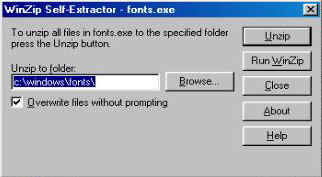
- You should get a window which looks like this
- Then click the Unzip button.
- When you get a message window saying "15 files unziped." then press OK.
- Restart Netscape navigator:
- Choose Options -> General Preferences:
- Select Fonts menu
- Set For the Encoding to User Defined
- Set Use the Proportional Font to NetNative
- Set Size 14
- Press OK
- Choose Options -> Document Encoding -> User Defined
Netscape users: Note that you can either set NetNative font under User-defined or Western.- You now should be able to read my persian pages.
Macintosh
- Download the font NetNative.sit and save in your home directory.
- To Install the font:
- drag NetNative.suit to your active system font folder
- Restart Netscape navigator:
netscape .html- Choose Options -> General Preferences:
- Select Fonts menu
- Set For the Encoding to User Defined
- Set Use the Proportional Font to NetNative
- Set Size 14
- Press OK
- Choose Options -> Document Encoding -> User Defined
Netscape users: Note that you can either set NetNative font under User-defined or Western.
- You should now be able to read my persian pages.
Unix
- Download the font nn_unix.tar.Z and save in your home directory.
- Execute the following commands:
- uncompress nn_unix.tar.Z
- tar xvf nn_unix.tar # This creates directory nn_fonts.
- cd nn_fonts
- mkfontdir
- xset +fp ~/nn_fonts # also add this and next line to your .login file
- xset fp rehash
- Restart Netscape navigator:
netscape .html- Choose Options -> General Preferences:
- Select Fonts menu
- Set For the Encoding to User Defined
- Set Use the Proportional Font to NetNative
- Set Size 14
- Press OK
- Choose Options -> Document Encoding -> User Defined
Netscape users: Note that you can either set NetNative font under User-defined or Western.- You should now be able to read my persian pages.