Using CDCs and DIBs
Drawing is almost always done in the OnDraw member function of the applications
view class.
// CProgView drawing function
void CProgView::OnDraw(CDC* pDC)
// Before entering this function, all the preliminary work necessary to
// drawing has been done. The function is passed a pointer to a device
// context ( pDC ). We can use pDC to access all the functions of the
// CDC class which handle most of the aspects of creating graphics.

{
    CProgDoc* pDoc = GetDocument();
    ASSERT_VALID(pDoc);
    // TODO: add draw code for native data here
}
Lines, Shapes, Pens, and Brushes
Use app wizard to create an SDI skeleton and try the following code in
the view's OnDraw function.
// CProgView drawing function
void CProgView::OnDraw(CDC* pDC)
// Before entering this function, all the preliminary work necessary to
// drawing has been done. The function is passed a pointer to a device
// context ( pDC ). We can use pDC to access all the functions of the
// CDC class which handle most of the aspects of creating graphics.
{
    CProgDoc* pDoc = GetDocument();
    ASSERT_VALID(pDoc);
     // TODO: add draw code for native data here
    pDC->MoveTo( 50, 50 );
    pDC->LineTo( 100, 50 );
    pDC->LineTo( 100, 100 );
    pDc->LineTo( 50, 50 );
}
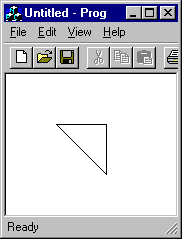
When you run the program it should look something like Image 1.
 [Image 1]
|
Notice that the line is one pixel thick, black, and draws
a solid line. This is the default for a pen. Try using other functions
of CDC such as Rectangle, Ellipse, RoundRect, Arc, Chord, and Polygon.
They use the same principles. Notice the shapes appear to not be filled.
Actually, the Brush is set to solid white by default and therefore doesn't
show up unless you change the background color. |
Below is a more complex version of the above using the Rectangle function.
// ProgView.h : interface of the CProgView class
//
/////////////////////////////////////////////////////////////////////////////

class CProgView : public CView
{
public:
CRect rectData;
protected: // create from serialization only
        CProgView();
        DECLARE_DYNCREATE(CProgView)
.
.
.
The above sets up a new CRect object data member, but doesn't initialize
it. To initialize it you can use either of the following.
/////////////////////////////////////////////////////////////////////////////
// CProgView construction/destruction
CProgView::CProgView() : rectData( 10, 10, 200, 200 )
// The above will initialize rectData. To some this may seem hard to read.
// They can use the 2nd method.
{
      // TODO: add construction code here
     rectData( 10, 10, 200, 200 );
}
and now it can be used ....
void CProgView::OnDraw(CDC* pDC)
{
     CProgDoc* pDoc = GetDocument();
     ASSERT_VALID(pDoc);
      // TODO: add draw code for native data here
     pDC->Rectangle(rectData);
}
Pens are used to draw lines. Brushes fill shapes. Simple enough. Window
includes several stock brushes and pens that can sometimes be useful. You
should check them out. If you want help other then the below example, you
can look in the help files with MSVC or you can email
me.
void CProgView::OnDraw(CDC* pDC)
{
     CProgDoc* pDoc = GetDocument();
     ASSERT_VALID(pDoc);
      // TODO: add draw code for native data here
      // Select stock black pen and draw rectangle
     pDC->SelectStockObject( BLACK_PEN );
      // rectangle filled by default white brush
     pDC->Rectangle( 10,10,30,30 );
      // Select stock brush to fill next rectangle
     pDC->SelectStockObject( BLACK_BRUSH );
      // rectangle drawn with black pen and filled with black brush
     pDC->Rectangle( 25,25,55,55 );
      // change to white brush because easier to see pen
     pDC->SelectStockObject( WHITE_BRUSH );
      // Create custom pen
     CPen penBlackDash( PS_DASH, 1, (COLORREF) 0);
      // Select it into DC and save currently selected pen
     CPen *ppenDefault = (CPen* ) pDC->SelectObject( &penBlackDash );
      // Draw dashed rectangle with white fill
     pDC->Rectangle( 50,50,80,80 );
      // Switch back to default pen
     pDC->SelectObject( ppenDefault );
      // Create custom brush
     CBrush brushSolidRed( RGB( 255, 0, 0 ));
      // Select brush into DC and save old brush
     CBrush *pbrushDefault = (CBrush* ) pDC->SelectObject( &brushSolidRed );
      // Draw rectangle filled red
     pDC->Rectangle( 75,75,105,105 );
      // Restore default brush
     pDC->SelectObject( pbrushDefault );
}
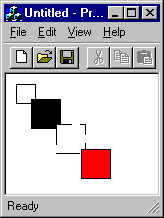
When runned the above should look something like Image 2.
|
I also threw in an example of using color above. Use RGB( red, green, blue
) sets. COLORREF is like RGB, but harder to set because it combines the
values.
|
 [ Image 2 ]
|
That's all for now. I'll start talking about bitmaps when I get a chance
to write more next week.
The content of this website is
copyright (c) 1998 by Mike Purfield (piGuy) and Brian Bintz (dead-ed)
All rights reserved. Windows IG
is a subdivision of TPU