We offer you the opportunity to learn almost every
major software package available and even some not so major software. Participate
from the office, or from your home at anytime!
Double click my computer icon. (it is usually in the top left hand corner)
Insert the diskette you wish to copy into your 3 1/2
floppy (A:) drive.
Click once on 3 1/2 floppy (A:) drive.
Click on File. (first word on the menu bar top left hand corner)
Click on Copy disk.
Now click on start and follow directions the computer will tell you to
do.
Part lesson from Windows 95/98
SHORT CUT TO LEVELING YOU ICONS ON YOUR DESKTOP
Turn on your computer
Point with your mouse to any space on your desktop that has nothing, and
blank space usually in the middle.
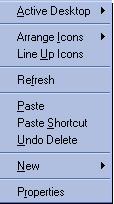
Click the right mouse button and a menu like below will come up.
Click once on Arrange Icons and you can arrange them by type, name, etc.
If there is a check mark in auto arrange the computer will keep all Icons
to the left side of your desktop. To remove the check mark you just click
on auto arrange and the check mark will leave and you can place your desktop
icons where you would like them.
Also if you move your Icons your self you can do step 2 again and then
click on Line Up Icons and your Icons will be very neat on your desktop.