|
I figured out something new for me in
psp! Heart shaped text! Oh I'm having fun now...look out lol decided to
take a shot at those watermarks too...I really don't like it...I think the
ones I've done this way is all I'm going to do lol It's been a long time
since I've tried to write a tutorial! I'm not too good at this, but I
wanted to share what I learned. Heart Shaped Text in PSP6 with Vector Text created by: ArticGraFx
I will attach both fonts I used, and the
pattern for using in sculpture. Download Materials used for this Tutorial
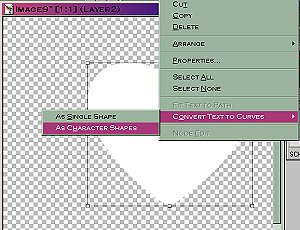
You can play with these to make your own shapes from scratch. Which I'm not too good at...so I was happy to figure out I could use dingbat shapes! Now right click again, and choose
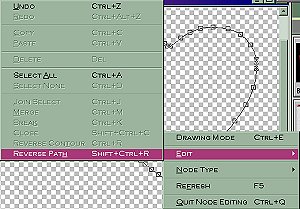
edit/reverse path (your cursor turns into the little text symbol (A) with a curve under it. ) You may want to save now, make a copy and keep your vector heart settings in a file to use again later. Now add a new raster layer to put your
text on, and name it text. Click on your new raster layer with the
text tool, and start experimenting. You need a fairly bold font to read
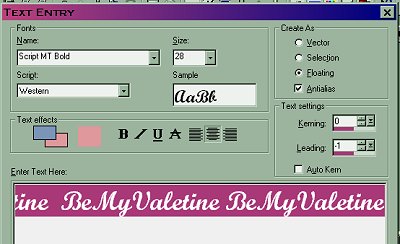
the text, but I wanted script too, so I chose Script MT Bold, at size 28.
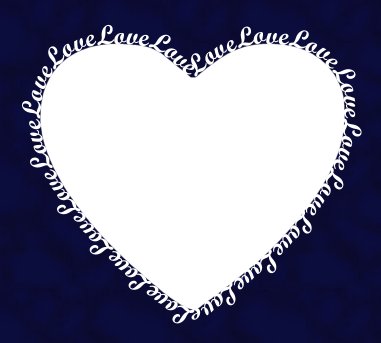
(after trying a few sizes that would fit) Type in The double space in the middle will be at the top of the heart...where the letters like to smush together.
Choosing a size that fits with an even number of words and spaces works best. (Like if you wanted to enter the one word Love, enter it an even amount of times...12 or 16 etc) Now make sure you've unchecked vector,
and checked floating again.
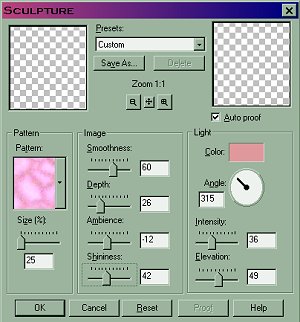
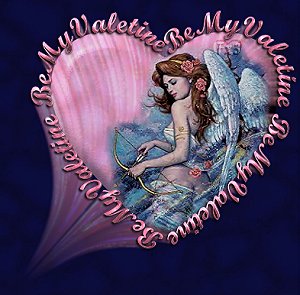
I used sculpture on this angel tag, with these settings, using the color I saved from my text.
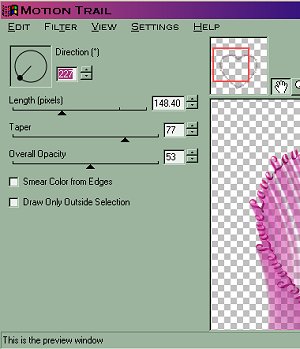
delete the selection. I used Eye Candy 4000 with these
settings. with the setting at 45. And then Image/Blur/Glaussian Blur at
1.00 right click and choose convert to raster. If the picture hangs out of the heart shape too much... Use your magic wand and click on the transparent background around the heart. Switch layers (with ants still marching) up to your tube/picture layer and hit cut. Almost done...you can leave the heart
white.. or you can invert the selection and add similar settings you used
on your text. or add a drop shadow to your tube etc...
Your tag is done!
More Heart Shapes by ArticGraFx tube attached
looks like this below Some tags for you made using the above tube! (Just right click and save to your computer)
More Heart Shapes by ArticGraFx Here's a couple more heart shaped text tags...told ya look out lol tube attached looks like this below (has transparent background, but needs to be used on a dark color because of drop shadow on text.)
Some tags for you made using the above tube! (Just right click and save to your computer)
The one at the bottom is a nekkid one...don't look if you don't like =)
Copyright © 2000 by Articfx3, all rights reserved
This site is sponsored and maintained in its entirety by Artists4psp Copyright © 1998-2001 by Artists4PSP, all rights reserved Artists4PSP Home Page | Join our Group | Contact: LdyArchrr
|
 500x500, transparent background.
 enter
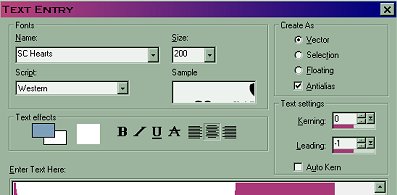
lower case "m" from the font SCHearts
enter
lower case "m" from the font SCHearts