| WINGATE HELP PAGE by Oxynaz | |
| SETTING UP LIVEUPDATE ON CLIENTS | |
| 1 on client computer click on "my computer", "control panel",
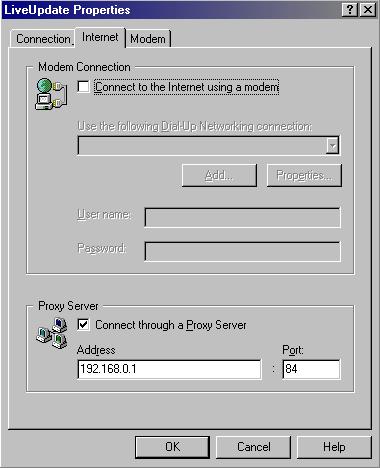
"LiveUpdate". 2 Edit LiveUpdate and make the following changes:
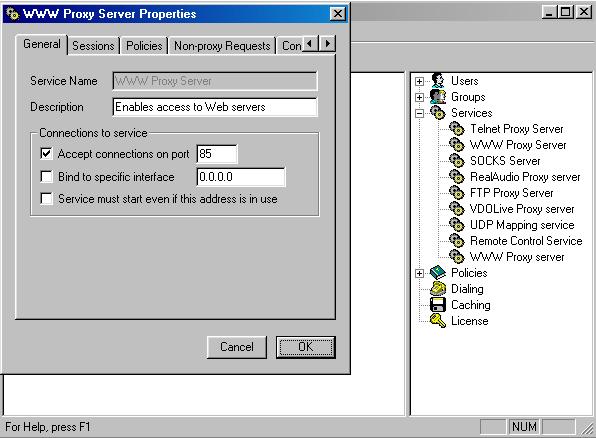
NB: here you must use your "WWW proxy server" of wingate, in the server. So write here the TCP/IP number of the wingate server and the port (by defaut 80 in wingate) BUT!!!!!!!!! if you have enable the cascaded proxy server, you must add in wingate a new "www proxy server" such me. And this new "www proxy server" must be used by LiveUpdate.
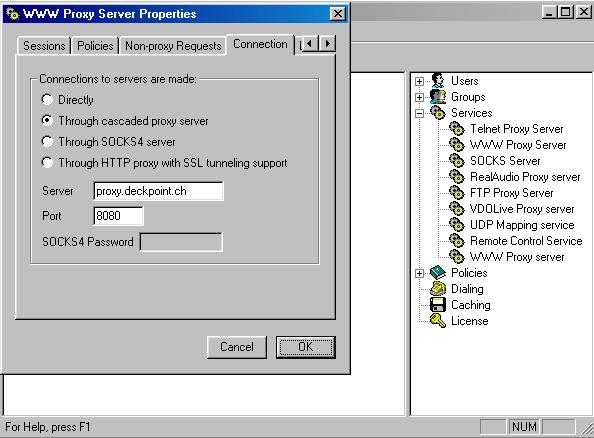
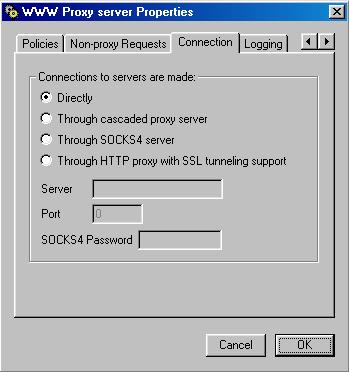
So, if your "www proxy server" in the wingate server uses the cascaded proxy, such here:
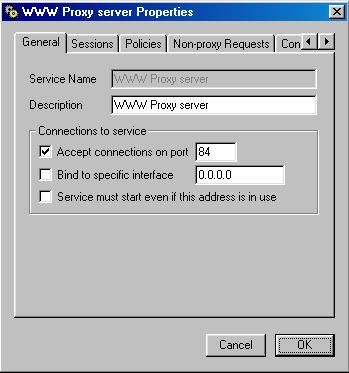
THEN YOU MUST ADD A NEW "WWW PROXY SERVER" ON OTHER PORT FOR LIVEUPDATE AND WITHOUT THE CASCADED PROXY SERVER BUT WITH A DIRECT CONNECTION:
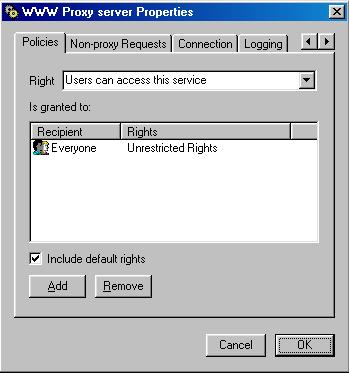
And add the "policies" too.
ET VOILA. |
|