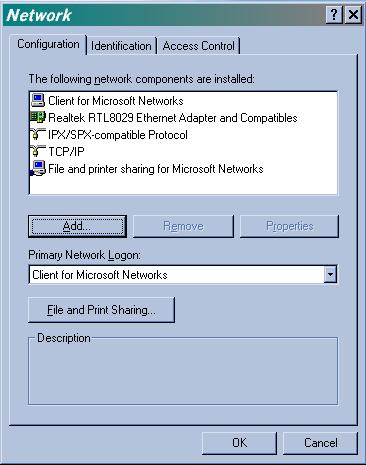
 Edit your Network settings in W95. Edit your Network settings in W95.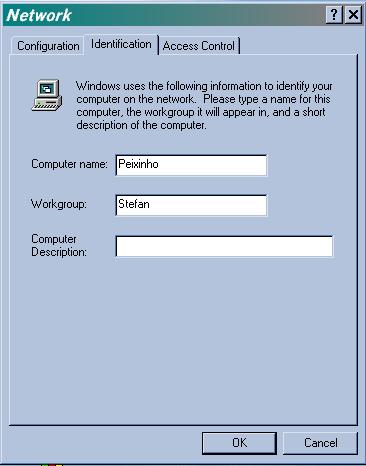 Give a name for
the computer and a Workgroup (domain name), the workgroup
must be the same for the server and client. Give a name for
the computer and a Workgroup (domain name), the workgroup
must be the same for the server and client.
 Select
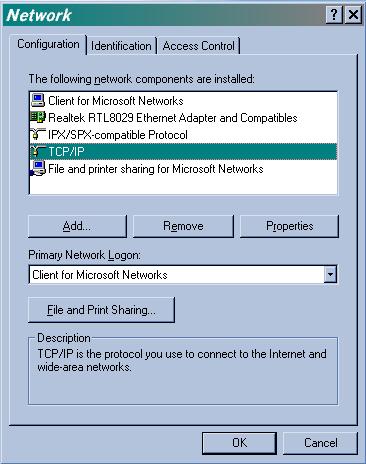
the TCP/IP protocol and click on "Properties". Select
the TCP/IP protocol and click on "Properties".
 Give an
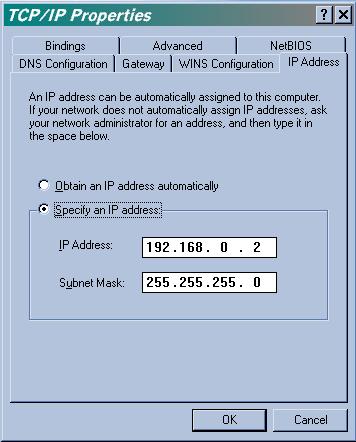
IP address and a Submask, the submask must be the same
for the clients and the server. Give an
IP address and a Submask, the submask must be the same
for the clients and the server.
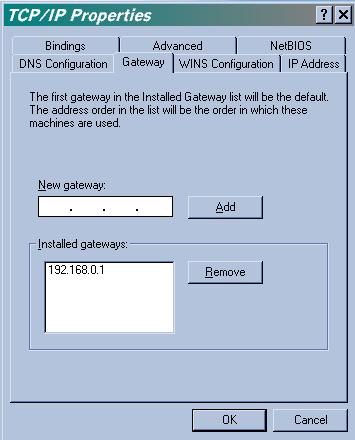 Add a
Gateway, this is the IP of the lancard of the Server with
wingate. Add a
Gateway, this is the IP of the lancard of the Server with
wingate.
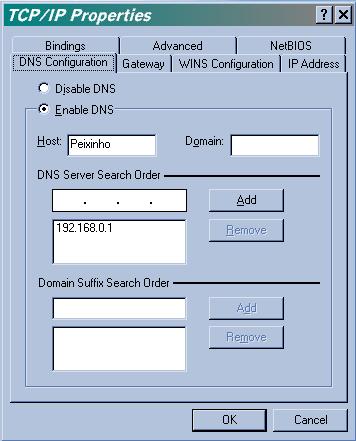 Enable
the DNS, give a name to your computer (the same as the
screenshot 2) and add the TCP/IP number of the server
with wingate. Enable
the DNS, give a name to your computer (the same as the
screenshot 2) and add the TCP/IP number of the server
with wingate.
ET VOILA.
|