____________________________________________________________________________________
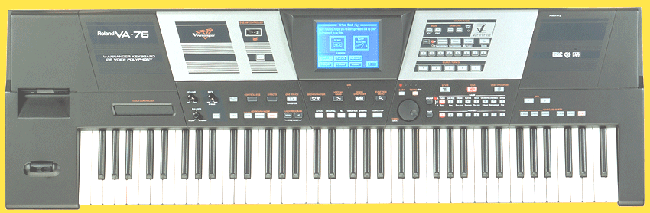
Roland ArrangerVA76

Price: $3.000.oo, if you dare. But I sell a virtual matching system
for only $ 700,oo.
(Live card + professional soundfonts + softwares).
INSTRUCTIONS TO CREATE STYLES
to Performer
(or other hardware or software that deals to .sty format)
 
By Maestro Ney 2002 [email protected]
Free styles and
soundfonts
(I'm receiving NOT money
from Performer. I'm just a fan). (Alexander, send me a full copy)
Click to hear a song that I play while you surf.
(Choose if you want open (just hear) or save it to HD):
"Aquarela do Brasil.mid" by Maestro Ney.
(If your PC is rightly configured. The quality will depend on your GM bank.
It will temporarily load in "Windows Temp" and play in your midi player).
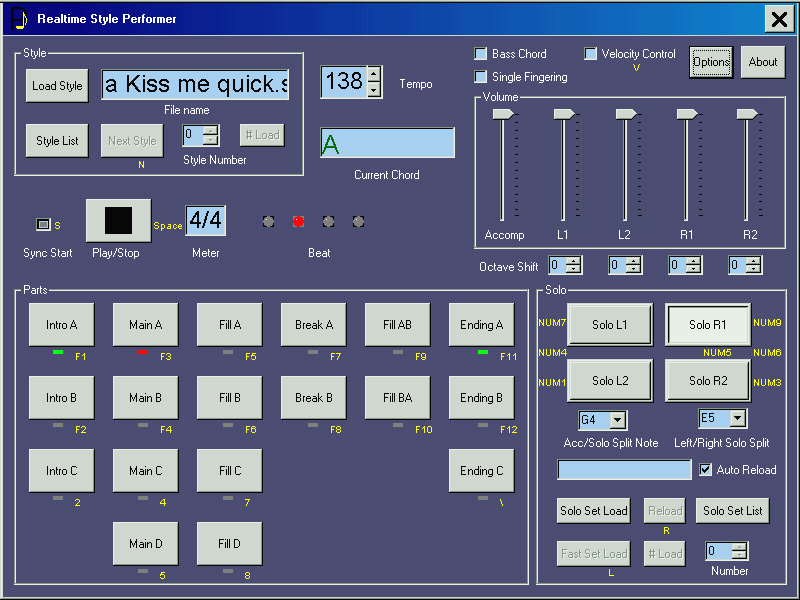
Captured
screen of Performer running a 'Kiss me quick' style:
(If you want download this Maestro Ney (.sty) style, click
here).
Comment of Dan Courier in Keyboard Magazine:
"Maestro Ney is a Performer wizard"...(Thanx to Jesus Mercy).

If you are a beginner,
use my Quick start for beginners and create a
test style in a flash with only Main A. (Then you, (lively (animado) after take
out the mistery of the thing), come back and follow my instructions to create professional
styles, assigning solo instruments with right volume, etc). (Performer
demo only enables Intro, Main A and B). (Pratically only Main A, because the
demo disables musical keyboard shortcuts, so you need to leave the keyboard to hold
mouse to switch between Intro, Main A and B, and it is dificult. You end using only Main
A). You need Cakewalk (any version), or maybe
other sequencer which suports MARKERS). ("Markers" are those reminders that we write
in Cake main screen, marking when begins the "Intro A", the "chorus",
or anything) (see screen below).
(I insist in Cakewalk because beyond to be the best sequencer, this guide is made
using it.
But if you insist in other sequencer, make the matching procedures, if you dare).
(If you are a professional, use my tips below "HOW TO CREATE PROFESSIONAL
STYLES"). |
Captured screen showing markers:

Quick
start for beginners (Beginners in styles creation to Performer .
Still children may understand).
Click the following link to see in another window a screenshot of
my style template in Cakewalk 9: Click here with right buttom.
My style template is to facilitate the life of both beginners and professionals.
(Even me). Click the following link to download
my style template.
(Choose "save as". It downloads in a flash, only 1 k).
Maestro_4x4
style TEMPLATE.mid
After download, open it in
Cake. Read carefully the following procedures before record= record first the Main A using MIDI
keyboard or mouse.
Markers at the end = Main
A (and all stylepart) needs
also a marker with valid name, at the end of the
stylepart, otherwise it will not run). Example=
The Main A end can be the Main B start marker;
Main B end can be "Ending" start, etc.
(Except Ending stylepart, of course, that needs not marker with name at
its end).
Select Main A and make Cakewalk play it loopped, cycling for
you rehearse.
Drums= To begin recording a style you need first record
drums in channel 10. (Performer recognizes not drums
in other channel.
It doesn't matter if you have megafont with Hubi's).
Metronome= To begin from scratch to record (good) drums,
turn on metronome playback and
record. Cowbell is the best and most used instrument for metronome.
Finally, now rehearse before to record.
(Don't try record without rehearse, if you want good results).
Recording= After rehearse enough, with sequence still
running press "R" to record on the fly, "in the
hot fever". (Record and delete how many times needed to a good
result).
After record reasonably, turn off metronome "playback and record".
Now record bass, then guitar, then string chords, etc.
(Follow a increasing order= Begin with channel 10 for drums, and then 11 to 16 for
other instruments).
Save the test style as "test" in MIDI Format
0.
Close Cakewalk. Go to Windows Explorer, where you saved the
style. Rename the extension (of the mid style) to
".sty". (When appears that annoying box warning "If the
extension of a file is changed, it may turn useless. Are you sure?" Click
"Yes").
Click the style file and press Enter to open Performer with the style loaded (your Windows Explorer must to be configured to open sty
with Performer); type "S" to "Sync Start"
(because is litle dificult to hit the "Sync Start" green hole with mouse),
and press a chord with left hand and the style will run.
Analyse the result. Press
space bar to stop.
If you like the result, that's all. (If not, go back to Cake to fix it
how many times needed).
Now, in a few and smart words,
HOW TO CREATE PROFESSIONAL STYLES
Well, first I create the style in
Cakewalk.
(Do you know to do it right, eh???)
(Mark the Main A, Main B, Intro A, etc).
CAUTION TO RECYCLED MATERIAL=
Some musicians on Internet allow to "take advantage" in creating styles using
measures from existing song sequences, but it is dangerous. Recycled garbage
material keeps some hidden data that causes problems in Performer= Make your styles from scratch.
(If you even so try recycled material and your style doesn't run, try again from
scratch).
If your sequencer isn't Cake 9, (the best), but it also create MARKERS,
maybe it can too, if you dare.
Click the following link to download my style template.
(Choose "save as". It downloads in a
flash. Only 1 k)=
Maestro_style TEMPLATE.mid
ALLOWED CHANNELS=
The AUTO ACCOMPANIMENT always perform from CHANNEL 10 through 16, and SOLO instruments
from 1 to 4 (Channel 1= R1, channel 2= R2, etc).
(I leave all other MIDI channels untouched in
Cake, because I already had problems in Performer).
(Don't confuse CHANNELS TO TRACKS. I'm speaking of CHANNELS. Restrictions are to CHANNELS,
not to TRACKS. Use TRACKS as you want).
In sophisticated styles, record each drum instrument
in a
different track, always in channel 10. With each drum instrument
in a different track, you can make it easier). (After you save and close the sequence,
when you open it again, all drum instruments will be grouped automatically in a
track).
Also it's good to record all drum instruments ahead of the styleparts, and then copy and
paste them to the style parts, always leaving the material there. So futurely you can make
editions easier.
Styleparts generally have the following instruments= drums, bass, a base rythmic
instrument (usually base guitar), a sustained chord instrument (usually strings. In the
60's we have used organ), and sometimes embellishing phrases floating over the style
(usually strings).
SOLO INSTRUMENT CHANNELS=
Set solo INSTRUMENTS that you will use for each style.
Set VOLUMES from channels 1 to 4= + or - 77, a reasonable level, but you need set the volumes with the style running. Then
you can return and edit volumes more precisely.
Performer demo also allows to adjust solo volumes, but you can't save. So
for you get fasten (fixar) volumes at a good level you need adjust them in Cake. Performer
full ables you to load instrument settings, but this seems complicated. Maybe with time,
with pratice, one can to find this easier. With the demo we get a poor help. We can't to
know how to use these instrument settings. Maybe the author sends for a purchaser a
sample file with these instrument settings, or give him some technical support that
he gave not for me, demo user...
Quantize=
After record reasonably well, quantize it
with enough percentage to your drums run correctly. (As sequencing,
almost never use 100%, that's too mechanical quantize. Try either 77%, 44%, or other value
that sounds as a good real drummer). ______________________________________________
ATTENTION! DON'T CLOSE
PERFORMER RUNNING,
NOR PRESS "SCAPE" OVER PEFORMER,
Otherwise Performer will freeze your computer and you'll
need reboot with Ctl Alt Del. (The PC willn't obey start menu shutdown clicks).
(Except if you are using Hubi's with megafont.
But with megafont, the solo instruments don't work).
BEFORE TO OPEN PERFORMER, SEE IF CAKEWALK IS OPENED, and before to open Cakewalk
see if Performer is opened !
(Otherwise you'll need re-configure MIDI in and out ports in Peformer or in Cake). |
|
Octave shift key
Performer
doesn't recognize Cakewalk octave shift key.
(F.e., if your solo instrument is too low octave, it's useless to increase the octave
in Cake. The octave remains the same in Performer).
The best solution is to change the octave in Viena.
But this is a hard task. Don't increase the octave in Melodic Pool, since the Melodic
Pool corrupts the sound. You would need to make a careful octave change in Instrument
Pool, puting lower samples a octave above. (Or higher samples a octave below).
Other solution is stay always changing octaves in Performer. (The change
always will be losed when you close Performer).
________________________
About the C
famous major 7+ (do-mi-sol-si) chord,
recording styles
To play dissonances in arrangers, some programs and keyboards requires to record the C
Major 7+ chord in the sequencer, but Performer not.
(But with those programs and keyboards that require it, don't forget the 7+(si),
otherwise your dissonances will sound not).
Recording styles, it's good also edit piano roll
and event list, as in normal song sequencings.Folder exclusive for Performer= To
turn your life easier, create it in "C"(HD), a folder named ",
Performer". (So Performer will appear at the begining of "C", and
so will be easier to find styles). Create also 2 subfolders= 1 for
"material". (mids, soundfont, alive (Creative Mixer.sea,
Creative Effects.ea2, the Performer's Help rtf, etc) and other for instal
Performer.
After all recorded and well edited,
make a good mix of
instrument and solo volumes.
Save as ".mid" 0 and close
Cakewalk.
(Don't forget to close Cake to open Performer, otherwise you'll disable Performer
MIDI in and out ports configuration).
(If you have megafont with Hubi's (Virtual MIDI cable), you don't need close
Cake. It's enough disable MIDI in. Read my site "megafont"
to learn more).
Go to Windows Explorer, rename the extension (of the style you have created) to
".sty", and go to Performer.
In repetitive and dense
editions on styles=
A fast way= To edit the style, close Performer, press Ctl Z, (the file returns
to mid extension) and press your shortcut to open your sequencer. (if you
have edited the style some minutes ago, the last thing you did in Win Explorer were to
rename it to sty, so clicking Ctl Z the file returns to mid extension).
When you want to test the style in Performer, close sequencer and rename it in
Win Explorer to sty and press fastly ENTER 3 times, (Performer
will open with the style loaded) and click "play" on Performer. (Hear
the result).
(These 3 clicks on the style are= Once, to enter the new extension; twice, to don't
see the annoying box "If you change this extension you will lose your
file"; 3rd, to open Performer).
|
Severe and short review about several arrangers
Click
to see (page 2) ========>
|


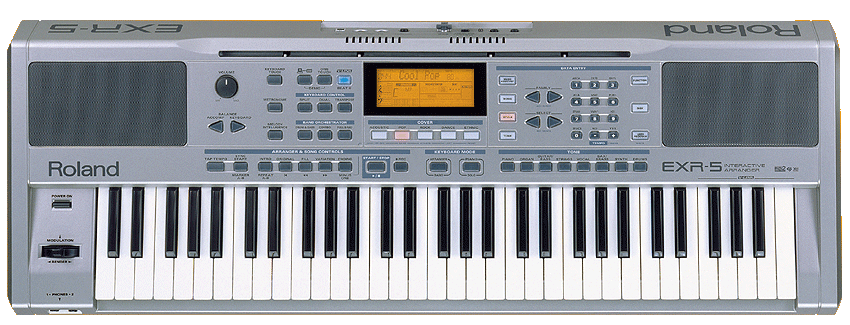 Roland
Arranger EXR5 (above)
Roland
Arranger EXR5 (above)