|
courtesy of CS Designs
|
|
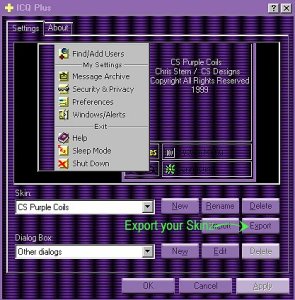
Once you have completed your skinz theme, you can share them with others by exporting them to a zip file. Exporting your own Skinz is easy. Just select the Export button on your ICQ Plus Menu. |
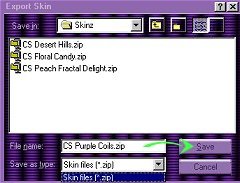
You will be presented with
the following menu. Find the directory you want to save your file to and
hit save. There is no need to give it a name as ICQ Plus will already have
selected one for you based on the name of the Skinz theme you created.
It will be saved in Zip format and will include all the files needed. Note!
While you might be tempted to zip these files yourself, you should be aware
that doing so may result in the skinz being unusable.
|
 
PREVIOUS
PAGE BACK TO MAIN
MENU
Any inquiries
or comments about this page can be sent to:E-Mail
|
|