Can I send
stationery to an AOL user?
Yes, you can, but it
takes a little manipulation. The AOL user must have
Internet Explorer installed in addition to AOL.
Step One:
Create your stationery.
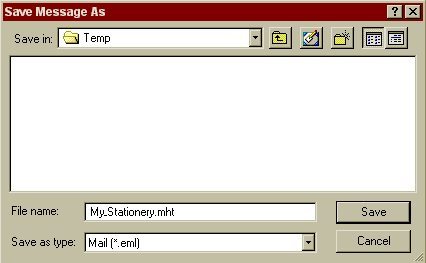
Instead of hitting the Send button, File|Save AS an
.eml file, but name it with an .mht extension.
Step
Two:
Zip the .mht WinZip can
be downloaded here: http://www.winzip.com/download.htm
Step
Three:
Send the
Zip file as an attachment in a plain text message.
Information
for the AOL user:
The file
can only be viewed using the desktop browser. You can NOT
see it in any part of AOL at all. Log onto AOL as you
normally do and then minimize the AOL program.Next, click on the
BLUE e for the desktop browser, click on FILE and then OPEN.It
will bring up a dialog box where you can BROWSE to the location
of the downloaded file. ONLY IE can see the file.
And NOT the built in IE in AOL, only the desktop Internet
Explorer which is part of Windows.