|

How
do I acquire the script from a post?
When you see a post
containing a script that you admire, it is possible to acquire
the script directly from the post. The way to do this is to:
1) View the html
scripting, copy and paste to Notepad or your HTML editor program.
2) Strip out all of
the unnecessary coding.
3) Create a template
by replacing the cid references with a path line to your graphics
or sound folder.
4) Save for future
posts.
Let's look at each step...
1) View the html
scripting (Cntrl F2). Copy and paste into Notepad.
2) Strip out all of
the unnecessary coding.
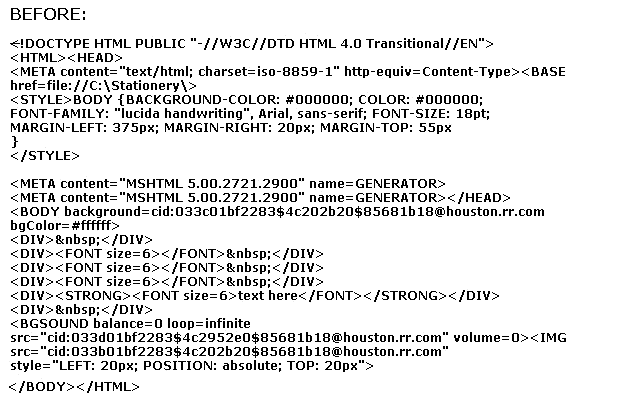
In this
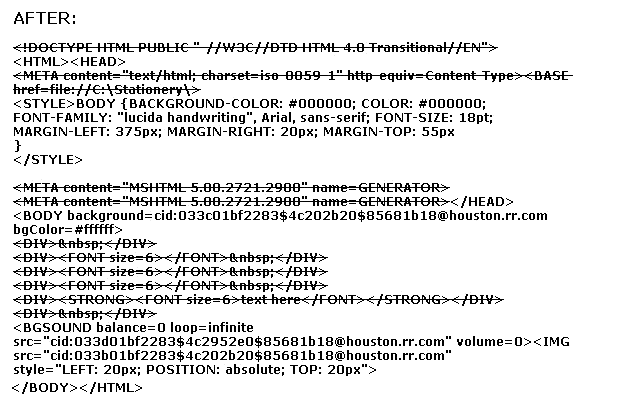
example, we have stripped out the doctype reference (OE will
reassign this automatically), all Meta Content references (also
automatically reassigned), the BASE href reference (this MUST be
removed as it references the file locations of the original
poster's images and sounds and may cause your images and sounds
not to embed if stored in a different location) and the text,
located between the DIV tags.
3) Create a template
by replacing the cid references with a path line to your graphics
or sound folder.
OE
references the embedded files, usually between quotation marks,
starting with cid. Replace the cid references with your full path
name, making certain to include quotation marks around each.
Leaving off the quotation marks might cause your image not to
embed.
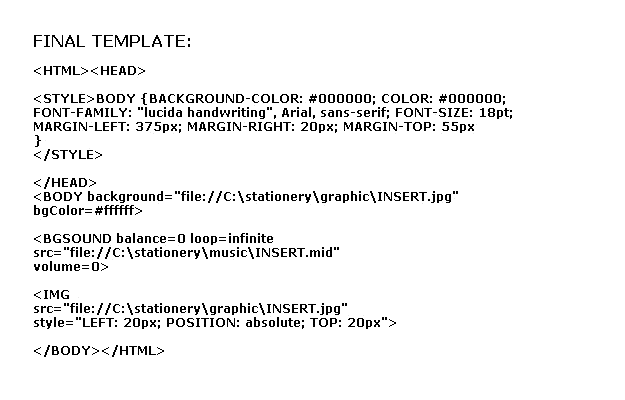
In the final
example, we have inserted the file path names to our own
locations. (Assuming you store your graphics in C:\stationery\graphic
and your sound files in C:\stationery\music, your template would
look like this) We have also separated the individual elements
for easy identification.
4) Save for future
posts.
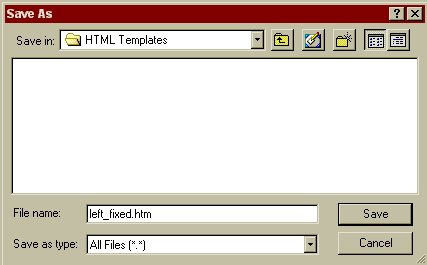
Save the
file in notepad and name it with a .htm extension. This script is
a fixed left position, name it something like fixed_left.htm.
Save as type All files (*.*)
Additional
information on this topic can be found at Edgar's site:
http://personal.nbnet.nb.ca/moomoo/NewTuts/Capturing_Posts.htm
|

