Paint in 3D
To be able to paint very accurate details on your model and match those seams up exactly, you must be able to see what you're painting, on your model, in 3DS Max as you go. If you have a 3D paint package like Deep Paint 3D this process is reasonably straight forward. But if you don't have a 3D Painting package, you can still paint in 3D, its just a little more fiddling about that's all.
Firstly in Photoshop you need to "Save a Copy" of your work so far, as a bitmap. Make the Bitmap, the format you wish to use for your final texture map, to keep things consistent ie. Targa, TIFF etc... Now open 3DS Max up at the same time as Photoshop( if your computer will handle it, other wise open them separately) and load your model. Create a new material and use the bitmap you just created as the diffuse map. Apply this material to your model. It should look some thing like this:
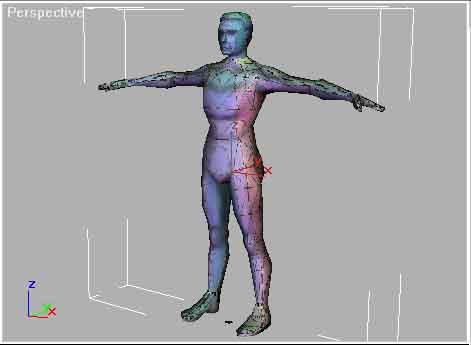
On the model you can now see the Texported coloured faces, as well as our painted detail so far! Of course the mapping coordinates have already been done, so everything just snaps into place. This way you can see how well you have placed details on your texture map.
This is also very useful if you're having problems figuring out where the faces on your texture will fall on the model, by identifying the colours on the model and relating them back to the texture map.
You can zoom close, in the Max viewport, to see how well the face details have lined up on the face so far.
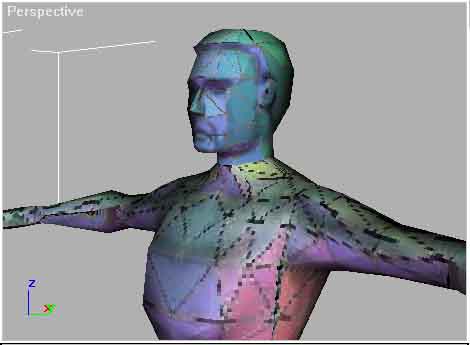
Now you can go back to Photoshop (or whatever package you're using) and continue working with the knowledge of how your work is looking on the final model.
Once you've made some more changes to the texture map, you'll want to see how it looks in Max again. You still need to "Save a Copy" of your work as before, but this time overwrite the last one you made. Then in Max, in the Material Editor, at the map level, find and press the "Update" button so that Max will reload the new version of the texture ( Max normally holds texture maps in RAM and won't update it unless you tell it to or when the file is first opened ). You'll see the new additions appear on the screen.
In 3DS Max, at this stage you can also readjust your mapping coordinates if you find it will make the texturing better.
This technique allows you to do some really nice texturing quite quickly, without having to buy any more software. Although if time is a concern, using a package like Deep Paint 3D is quicker and will pay for itself in no time.