
| Downloads | MySS Info | ToolKit Info | Register | Home | Features |
There are seven screen tabs on the Setup Screen. These links will take you to each screen.
The bold tab name above each screen shot
links back to the links above.
Use the links under the bold tab name to go directly
to that area of help.
Or you can click on the control in the screen shot.
| SSKit Button | |
Go to Screen Shot
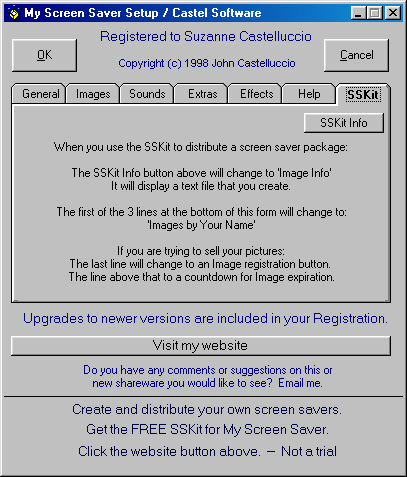
"ToolKit for My Screen Saver" This is a Freeware program that is available at my Web Site. It enables you to create & distribute your own screen saver with your own image files. It uses the setup files from My Screen Saver version 5.1 or higher. The SSKit does NOT require the installation or registration of My Screen Saver. It is absolutely FREE. -- When you make your own screen saver this tab changes to Images.
"SSKit Button" This displays a text file that gives you more information about the ToolKit for My Screen Saver. When you make your own screen saver this button changes to Images. The text file displayed will be the text file that you create to give your users the information that you see fit.
Go to Screen Shot
Overall:
"OK" will save your changes and exit the setup.
"Cancel" will discard your changes and exit setup. The "X" at the top right will also do this.
"Website" This button is a hyperlink to my website on the internet. If you are not on the internet, it should bring up your sign on screen. If it doesn't, then your PC settings need to be adjusted and that is beyond the scope of this help. If you are already signed onto the web, it will take you to my home page. From there you can check to see if you have the latest version of My Screen Saver. You can also check out the help pages. Eventually I will have a FAQ page, that you can check out. You can also see if I've managed to finish any new shareware.
"Start up Delay" There is a built in delay of approximately 20 seconds when the Screen Saver first starts and after the Password or Ask On Exit screens are canceled. During this 20 seconds, all mouse action and keyboard activity is ignored. This is to give you time to move your hand away from the mouse or keyboard.
Go to Screen Shot
| Downloads | MySS Info | ToolKit Info | Register | Home | Features |
Copyright 1999 John Castelluccio