Home
 The Wheel
 Wheel Designs
 Shifters
 Clamps
 Pedals
 Calibration
 Electrical
 Pin Charts
 Buttons
 Clutch
 Parts
 Links
 Simulators
 Electrical
grnled_blink

Wiring the Controls

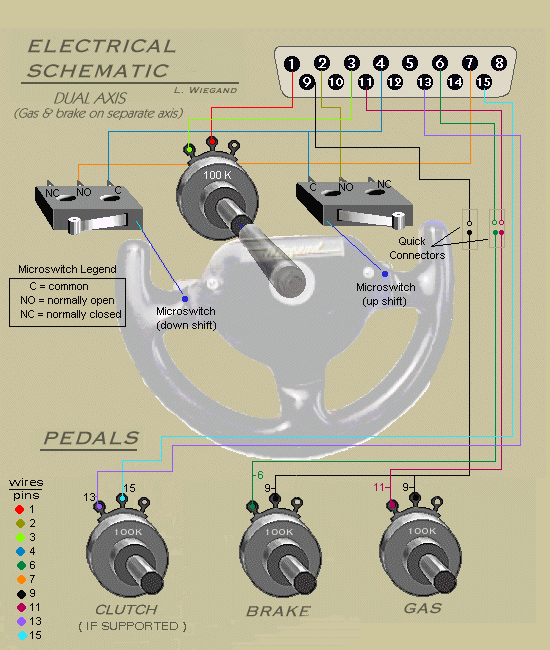
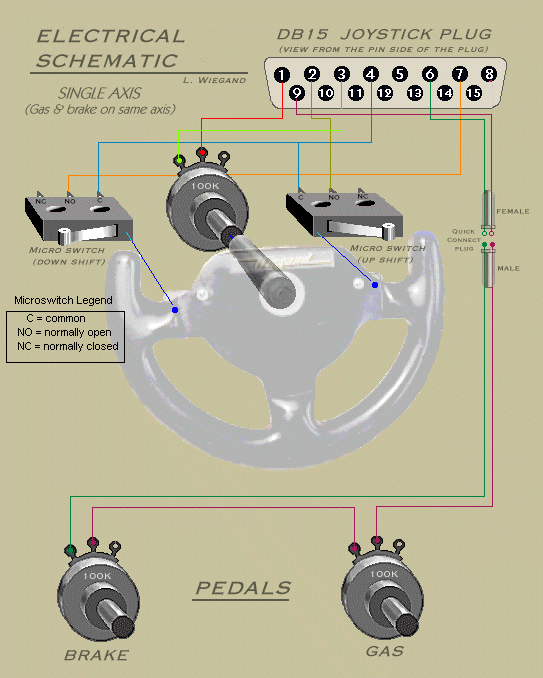
Please note some changes as of 7/8/99, that I've made in the wiring and pin assignments. These changes have made it possible to use just one switch for single to dual axis switching instead of two.

In single axis

1. Use of the +5v output of pin #9 instead of pin #8.

2. Pin #6 now connects to the left brake lug instead of the right.

3. Pin #9, instead of pin #8, now connects to the center brake lug.

In dual axis

1. Pin #6 now connects to the left brake lug instead of the right.

2. Pin #11 now connects to the left gas lug instead of the right.

This diagram illustrates a single axis setup, which works the same as a joystick. In other words, you cannot accelerate and brake at the same time, because they're on the same axis. Obviously, you cannot push forward and pull back on the stick at the same time. If you want to have both work simultaneously, or to use the "Heel&Toe" Ayrton Senna technique,  then you must use a double axis setup. Go to the second diagram, which is right below this one, for double axis wiring. I've also added an analog clutch to this diagram for games that support it.

Single Axis
scmatic2 

Dual Axis

scmatic3 


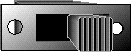
sl_swtch

A DPDT slide switch looks like this and has 6 terminals on the back of it.

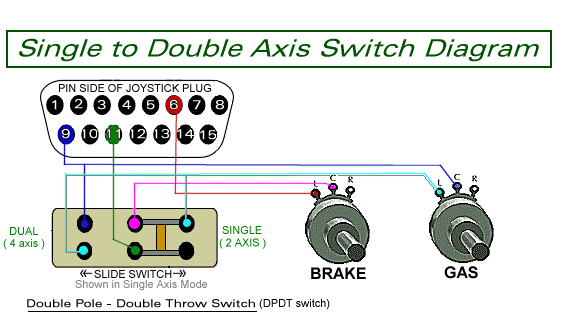
Axis Switch

axis_switch

This is a very simple switch that can be placed on your wheel unit, which allows you to select either a single or dual setup. Some sims allow for only single axis operation, while others accommodate both single and dual. This switch makes it easy to enable either one without having to rewire your pedal unit.