Technology Resources
Hardware, software, and humor. What more can you ask for? The games section is a must-read for you current and classic gamers. Anything I highly recommend is marked with "(resident pick!)". Consumer electronics to come soon.
This page is long, so here are the sections:
Hardware
Software
Help
Humor
Hardware
These are my personally recommended hardware choices. Why should you care about it? So you can appreciate the difference between new and old and decide if an upgrade is really worth it or if you should just buy a new system or if you're good for a while.
Processors
Clock speed isn't everything! The true measure of processor speed is total execution time of a given program. This means it's program-dependent, so benchmarks serve to compare running times of common programs, which would only be valid if you run those programs.
Let me say a quick word about benchmarks. Benchmarks serve to provide only one piece of information: the devices under test can only be fairly compared when the setup (surrounding and supporting hardware) is comparable, and it only applies to one piece of software or a benchmark suite. In this sense, benchmarks can be used to properly convey a speed advantage (ultimately a time advantage) among several pieces of hardware for the software in question. Execution time is the only universal indicator for speed, so it's the only thing that matters. Whether the slightest time advantage is worth the extra cost in hardware is up to you.
Hardware (or software) manufacturers can cheat on their own benchmarks by optimizing hardware (or software) to run better on it. Sometimes this is not cheating, especially if the benchmark is universal (hard drive throughput, memory bandwidth, pure clock frequency, memory latency, etc.), or if it the hardware (or software) is designed exactly for that optimization. For an example of good and fair benchmarking studies, see just about any study on Tom's Hardware Guide. (For a bad one, see any study paid for by Microsoft.)
|

|
Advanced Micro Devices (resident pick!)
AMD took Intel's x86 (IA32) architecture and super-charged it. Maybe even took it to the next level. It's got a superior FPU (floating-point unit) for those intensive scientific and graphical applications (CAD, spice, Matlab), and comparable performance to an equivalent (e.g. Intel) processor running at a higher clock speed (hence the model numbers 1500+, etc.) -- this is the subject of some debate, but remember two things: (1) AMD is making processors that do just as well as Intel processors while running at lower clock speeds, and (2) Intel will start using model numbers in the future because their Centrino line runs at lower clock speeds while still providing decent performance. The latest AthlonXP line works best on DDR SDRAM and newer Abit and Asus motherboards. The next generation 64-bit processors, the Opteron line, provide even better performance, especially for servers, while retaining backward compatibility with excellent 32-bit performance. Bottom line: AMD gives more bang for your buck.
|
|

|
Intel
Intel revolutionized home computing with its x86 processors. The 80286 kicked major butt over an Apple II in schools around its time. Now it's got the Pentium 4 line, which uses Rambus DRAM or DDR SDRAM. Rambus has its own questionable story altogether, so it's your choice whether to support them or not. Read about them in Tom's Hardware Guide (also linked below). I personally recommend a SDRAM over the Rambus stuff if you're in the Intel camp, unless you really need the bandwidth, and money is no object.
|
Motherboards
Nowadays you really only need to worry about this if you want to tweak, overclock, or mod your system. Or if you want built-in features like LAN, RAID, USB 2.0, IEEE 1394 (FireWire or i.Link), audio, or video onboard. Most motherboard manufacturers like Asus, Abit, and MSI are based in Taiwan.
|

|
ABIT Computer Corp.
Abit paved the way for jumperless motherboards, starting with their Pentium II-class boards. Now does P4 and Athlon.
|
|

|
ASUSTek Computer Inc. (resident pick!)
Asus just about made history with the P2B, using Intel's 440BX chipset with a Pentium II. I still have mine. It still did better over Intel's later chipsets for PII/PIII. Now they make top-of-the-line motherboards for Intel P4 and AMD AthlonXP, with standard features like RDRAM or DDR-SDRAM, RAID, and AGP4x (eventually AGP8x).
|
|

|
MSI Computer Corp.
MSI makes solid motherboards, especially all-in-one boards integrated with audio, video, and network. I just got a K8MM motherboard for my new Athlon 64 system. It's mATX format, and I can put it into a good Antec Aria case when I save a bit more for it.
|
Graphics Cards
All modern computers have enough graphics power for most applications, even most CAD drawing programs, since they tend to rely more on the processor. For fast real-time rendering for certain applications (games), the graphics power is important. Look for fast refresh, high frame rates, and faster and larger video memory. Some users want multimedia capabilities and TV-out too.
|

|
ATI Technologies Inc.
ATI's been around for a long time, with commercial success starting with the Mach8 cards. The Mach line went up to Mach64, then ATI started the Rage cards, to be succeeded by the Radeon series, then starting to sell its chips for other boards. ATI lost its edge with gamers when Matrox and 3dfx joined the scene, but always had a place in the multimedia market with the All-in-Wonder models. It came back with a vengeance with the Radeon 7000 series, and now holds its own against nVidia. The Rage and Radeon Mobility chips are for notebooks.
|
|

|
nVidia (resident pick!)
nVidia made its breakthrough into the video card market with the TNT chips used by third-party OEMs such as Asus and Creative. It was still not as favored as the dual-Voodoo2 setup, so then came the TNT2 Ultra. The landmark chipset is the GeForce256, which used SDR-SDRAM and offered 256-bit graphics power. It followed up with the GeForce2, using DDR-SDRAM, then the GeForce3 (a version of which is in the Microsoft Xbox). Now it's up to GeForce4, with the top-of-the-line Ti 4600. For budget users, the GeForce2 MX and GeForce4 MX lines do very well even in newer games. The GeForce2Go and GeForce4Go chips are for notebooks.
|
Sound Cards
As with video, most users will be fine with a cheap PCI sound card or onboard audio. For those in high-end sound with gaming or at least semi-professional sound editing needs, this is important.
|

|
Creative Labs (resident pick!)
Creative Labs took the popular Adlib card and made a full multimedia card just by adding sound effects and speech capability for added game-playing value. It used the same synthesizer chip Adlib used plus a DAC for effects. The SoundBlaster had instant success, and Creative went on to make the SB Pro with stereo. The SB 16 started the multimedia upgrade kit trend with sound card and CD-ROM drive bundled with software. Then came the WaveBlaster add-on to the SB 16, the SB Awe32 and Awe64 to replace both in one board, and the PCI cards. First came the PCI128, then the landmark SBLive! to dominate the high-end gamer market. Most other manufacturer's chips and cards work fine for most users, but for the higher-end market, Creative came out with the Audigy and Extigy. The new Audigy 2 has true 24-bit/96 kHz sampling and an IEEE 1394 (FireWire or i.Link) port. Plus it's the only sound card that has a THX certification.
|
Human Interface Devices (keyboard and mouse)
These may very well be the most important things to spend a little money on, especially if you work all day on a computer. First, get a good monitor (currently beyond my scope for brand-name recommendations), the bigger the better, LCD helps too, and set the refresh rate as high as it will go (the lower of the maxima between video card and monitor). Then, get a comfortable keyboard and mouse. Some of you, like me, will need to use a trackball, but it helps to have a standard mouse connected too for when other people need to take over your console to demonstrate something.
|

|
Logitech (resident pick!)
Logitech is, I believe, the largest, and (in my opinion) best manufacturer of human interface peripherals in the world. For keyboards, I recommend whatever standard or ergonomic keyboard is most comfortable. It helps to have multimedia keys, but those require installing a driver. The minimum set of multimedia keys includes volume up/down/mute, plus maybe media player controls (which should support programs other than Windows Media Player like Winamp). Same goes with mice, though I recommend at least a Mouseman Optical for either-handers or an MX700 for right-handers. I use a Trackman Optical, which is right-handed and thumb-controlled, but many others also recommend the Marble Mouse for either hand, index-finger-controlled.
|
Hardware Guides
Get used to the jargon. Read all about hardware and compare the newest gadgets. Decide if it's worth upgrading your GeForce3 Ti 500 to a GeForce4 Ti 4600 (sorry, old example).
|

|
Tom's Hardware (resident pick!)
My daily reading. Tom's staff, including sometimes Tom himself, reviews just about every kind of hardware, including extensive performance tests and comparisons. They also have news in the computer and electronics world, in scientific research and in business.
|
|

|
SysOpt.com System Optimization Information
SysOpt which also tests and reviews different kinds of hardware.
|
So what have you got?
My computers are humble by today's standards, but I built the machines specifically so I have exactly what I want in them. Besides, I get what I want done on them.
Home machine:
I use this for a lot of the CPU-intensive work, for gaming, and for connectivity purposes, meaning the photo printer, digital camera, DV camcorder, scanner, etc. all plug into this. Has hibernate support, which I use on this machine. Do I need a high-end GeForce or Radeon? It's not worth it to me yet until I start playing more new titles. Counterstrike, DWI (DDR sim), emulated console games, and classic adventure games are my thing now. It does run Doom III decently, with the 256 MB of video RAM on a low-end GeForce FX. Also, the SATA drive works natively under Fedora Core 5 (which is currently installed, ultimately to replace my server system). Boo ya!
- MSI K8MM-ILSR with an Athlon 64 2800+ 1.8 GHz, Crucial 768 MB PC2100 SDRAM
- nVidia GeForce FX 5200 256 MB
- Creative SBLive! Value (E-mu 10K chip)
- Via 10/100 LAN (onboard)
- Maxtor 300-GB SATA HD
- LG DVD-RAM/-R/W/+R/W Drive
Server:
This Linux box serves all the Windows machines (network drives via Samba) as well as my backup web and FTP. Yes, the graphics and sound are overkill for the server, but I do like to play music on it (sometimes locally, usually remotely from the other machines), and I got both of those cards cheaply. I use it as my main workstation for web, cd ripping and cd burning when I don't feel like turning on my notebook. Note: all of these devices have native support in Fedora Core 3 and above! (Currently runs on FC3.)
- Asus A7V333-X with an Athlon XP 2100+ 1.7 GHz, Ultra 512 MB PC2100 SDRAM
- PNY Verto (nVidia GeForce2 Ti 64 MB)
- Creative SBLive! 5.1 (E-mu 10K chip)
- Broadcom LAN (B44)
- Western Digital 250-GB HD
- Western Digital 80-GB HD
- Toshiba DVD-R/RW Drive
- iomega zip250 Drive
Notebook:
Now my main workstation for work and stuff I haven't figured out in Linux yet. Why? It's low power (especially with an AMD Turion 64) and hibernates (mostly) flawlessly for faster boot-up. It can do almost everything my home machine can do. Not as much of a 3D game machine (decent mobile ATI graphics) though but Counterstrike works fine on it. All these devices have native Fedora Core support, like those of the server. I repartitioned the hard drive, reinstalling Windows with XP Pro SP2 on the main partition and Fedora Core 5 on the other partition.
- Compaq Presario V2311US (V2300/V2300US series) with AMD Turion 64 ML-28 1.6 GHz, 512 MB PC2700 SDRAM
- ATI video (Mobility Radeon XPress 200M 128 MB shared) with widescreen 1280x768 display
- Conexant audio (CX20468-31)
- Realtek LAN (8139)
- Broadcom WLAN b/g (BCMWL5)
- Toshiba 4200-RPM 60-GB HD
Drivers:
ATI Linux driver detail (FC5):
- use generic drivers for X in the meantime and open console window as root
- run "X_VERSION=x690 sh ati-driver-installer-8.19.10-i386.run" and choose "Install Driver" and "Automatic", then
- run "/usr/X11R6/bin/fglrxconfig" with most default options and
- edit /etc/X11/xorg.conf: add 'Modeline "1280x768@60" 80.14 1280 1344 1480 1680 768 769 772 795 +hsync +vsync' under Section "Monitor" | Identifier "Monitor0", and edit the Modes line under Subsection "Display" thus: 'Modes "1280x768" "1024x768" "800x600" "640x480"' (my example file (unzip and rename the file within to xorg.conf)), and finally
- restart the server by restarting the computer (you may have to set the resolution rebooting the first time)
WLAN Linux driver detail (FC5):
- from the FC5 source disc(s), install the packages: kernel source (kernel-devel-...) and wireless-tools,
- copy the Windows drivers for the BCMWL5 to a folder, say ~/bcmwl5,
- download and extract ndiswrapper 1.15,
- "make" from the ndiswrapper-1.15 folder to compile,
- "su -l" to change to root
- "make install to install ndiswrapper, then (making sure /sbin is in the path) "ndiswrapper -i bcmwl5.inf" from the folder where the Broadcom wireless drivers are (example ~/bcmwl5),
- "ndiswrapper -l" to actually install the drivers,
- "depmod -a" and "modprobe ndiswrapper" to get the module to load
WLAN usage script:
#!/bin/sh
#
# required once after each boot; run as root
# keep one for each wireless network
# be sure any wireless on/off switch is on before running
# replace stuff in brackets with its appropriate values
#
iwconfig wlan0 essid [wireless network name] # to set which network to use and be sure it appears in the list displayed with the following command
iwlist wlan0 scan # to start the wlan0 interface and list the networks
iwconfig wlan0 mode Managed # (usual case)
iwconfig wlan0 key open [wireless network key] # only if a key is required
ifconfig wlan0 up # to bring up the interface; note that it's ifconfig and not iwconfig this time
dhclient wlan0 # to bring up the network
Classic machine:
To play old games built for legacy equipment (i.e. DOS and Adlib/SoundBlaster), like old Sierra and LucasArts adventures and Origin flight and RPG games. Really a requirement until emulation works flawlessly. Runs in Windows 98 Second Edition. Graphics may be overkill, but cheap. I can run some DirectX 3D games and DWI even though the processor is slower.
- Asus P2B with a Pentium II 400 MHz, 128 MB SDRAM
- eVGA video (nVidia GeForce4 MX 64 MB)
- Creative SB16 with WaveBlaster
- Belkin 10/100 NIC (Realtek 8139)
- Maxtor 20-GB HD
Why do you have so many computers?
- That's what happens when you keep upgrading.
Software
Recommended software. Operating Systems, desktop publishing, games, emulation.
Operating Systems
Anyone seen the smear campaign from Microsoft, "Get the facts" about Linux? It should really be called "Get the FUD" (Fear, Uncertainty, and Doubt). (I can't take credit for this one. The nickname is used on at least one open source website, OSI, in this article.) The latest one uses a contrived benchmark to "prove" that Windows Server 2003 is faster than Red Hat Advanced Server 2.1. It's easy to get those results when Microsoft hires a company to produce them in an isolated situation with the latest version of Windows Server and an RHAS 2.1 running with an old Linux kernel without comparable settings. You can read user comments about the VeriTest "study" on Linux Today.
|

|
Fedora Project (resident pick!)
Fedora is the free version of Red Hat, the development platform on which Red Hat Enterprise Linux is based (for the most part). I tested Fedora Core 3 (FC3) last night (27 Apr 2005), and it looks good. There were some pieces of software not included here that were included in Mandrake 9.2, but it does come with Firefox 1.0 and OpenOffice.org. I had to use the text installer since the graphical one didn't like my laptop's video adapter (unlike Mandrake >= 9.2), so I missed some of the fine-grained software choices and possibly the setting of defaults like the bootloader default (Windows, until I get hibernate working in Linux) and the desktop default (KDE). To change the default OS in the grub bootloader, I edited /boot/grub/grub/conf to get the second entry, Windows ('default=1') to load by default. Then I edited /etc/sysconfig/desktop to get a default KDE ('DESKTOP="KDE"' and 'DISPLAYMANAGER="KDE"'). The details are in Mauriat Miranda's 'Personal Fedora Core 3 Installation Guide', which told me everything I needed to know to get these defaults. Fedora Core 4 is coming soon, and that's up to version Test 2.
Update: so far, so good with Fedora Core 3 on my laptop. Currently, the up2date program doesn't work for me, but I can get by. I was able to get my missing programs (from my text-based install) loaded from the install DVD, like Grip (similar to CDex for Windows), and K3b. I haven't tested these on the laptop on FC3 yet, but they work fine on the server. I had to download the rest, like Wine (VM for Windows programs to run natively in Linux) and xine (media and DVD player). I did get Wine to install and run Firefox 1.0.3 for Windows along with Flash and Shockwave and play Jumble, using Shockwave! I got the latest xine and xine-lib from Fresh RPMs, which required aalib, libdvdcss, and libXvMCW). Once I got all the RPM dependencies fulfilled, xine ran perfectly for MPGs and played commercial DVDs! In KDE, FC3 also recognizes my USB flash drive (Sandisk cruzer mini), available from the file manager, Konqueror. The only things I have yet to get to work are hibernating (Software Suspend) and my wireless 3com 802.11b card. I have yet to test CD burning (which should work), accessing my digital camera, and syncing with a Palm, all of which are built into FC3, and maybe using Cisco VPN in Wine along with my work software to work from home on Linux.
Update: Fedora Core 4 evaluation: It seems to need more hard drive accesses than FC3 did (probably from automatic updating), and the included version of KDE has the Windows key "bug"; I think I like FC3 better so far, and it's already been (more than FC4) thoroughly tested (of course; FC4 came out 13 Jun 2005) Luckily, I used my spare notebook hard drive, so my FC3 installation is unaltered. I'm still a little torn on whether to use FC4 on my home server or use the established FC3, but I'll continue my evaluation, and maybe heed the advice on Mauriat Miranda's 'Personal Fedora Core 4 Installation Guide'.
Update: I put FC3 on the server some time after the evaluation, more challenging because I didn't have a new and bigger hard drive than my previous one. I'll probably upgrade to FC4 soon, now that I've had some problems with FC3 (but not major ones). FC3 works much better for me than at least Mandrake 9.2. The home web server runs on Apache 2.0.52 on FC3.
|
|

|
Mandriva Linux (formerly Mandrake Linux)
A Red Hat-based version of Linux, quite the stable and cool operating system, optimized for Pentium-class processors, PowerPC, AMD64, and other processors. Currently up to version 2006 on 3 CDs or 1 DVD and always free for download (the "Download Edition"). No separate versions for server and workstation; this does it all.
|
|

|
Microsoft Windows XP Professional
I've been a Windows 2000 fan (at least over XP) until I used XP Professional. I've warmed up to XP now primarily because of XP Pro, which can be made more like 2000 than XP Home can. Though the limited install thing is a bother, you can get around it by using Symantec/Norton Ghost to back up your system immediately after a basic Windows XP install. Or if XP came with your system, you probably have some kind of restore CD or CD set to bring the system back to the factory hard drive contents.
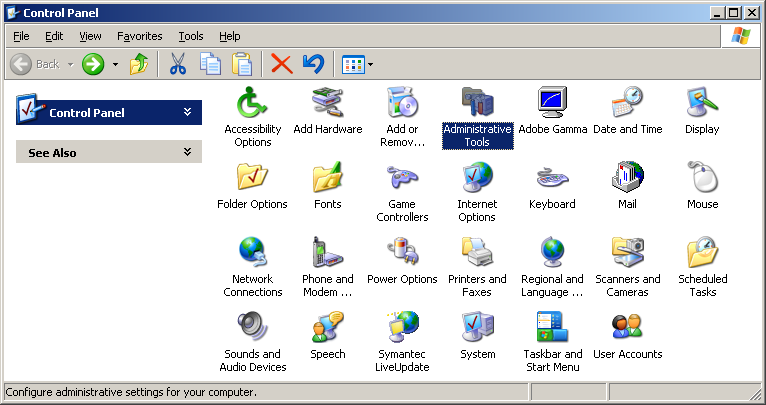
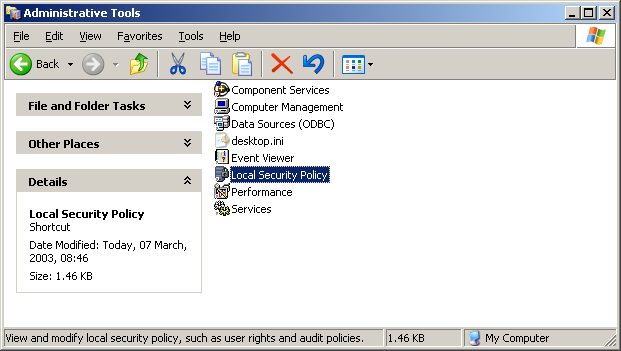
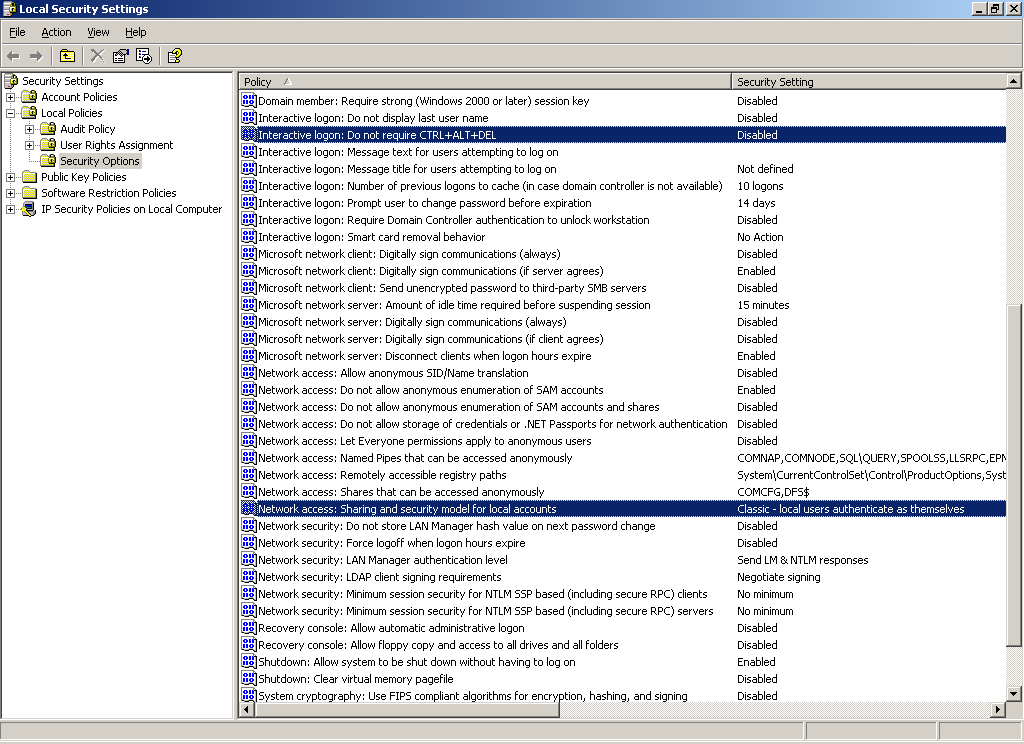
So, here's how to do the per-user security thing. It's a secret, I guess, because it's not really documented. It also only works in XP Professional and not XP Home Edition. You have to go into Control Panel and select Administrative Tools, then Local Security Policy, and modify these Security Options (the two options are highlighted in the picture for clarity, but this is not possible in the actual window):
Set Interactive logon: Do not require CTRL+ALT+DEL to Disabled
- This is the same as the Secure Boot setting in Windows 2000 under Control Panel to require Ctrl-Alt-Del for logon and unlock from hibernate, standby, screen saver, or just plain locking. This is especially handy if (a) you have kids (especially under age 3), (b) you have no password (just press Enter), and (c) you care if your files stay intact.
Set Network access: Sharing and security model for local accounts to Classic - local users authenticate as themselves
- This allows each folder to be shared differently by different users, just like in Windows 2000. This will not only help protect overwriting by other people on your network, it can protect you from yourself accidentally deleting the copy you think you're saving.
- Alternatively, you can go to Tools | Folder Options | View in any Explorer window and uncheck "Use simple file sharing (Recommended)" at the bottom of the Advanced settings list. But if you're doing the Secure Boot thing above, you may as well use the same window to change this setting.
|
Desktop Publishing
All of my DTP recommendations below are free software, most of them open source. These programs are, in my opinion, just as good, if not better, than their commercial counterparts, if they exist.
|

|
OpenOffice
This is the free, open-source office suite that rivals Microsoft Office, and runs on just about any platform, especially most Unix variants and Windows. You can read Microsoft Word, Excel, and PowerPoint files, edit them, and write them back too, or choose OpenOffice's XML-based (binary) file format. Also, export any document to PDF, an option built into OpenOffice. No more need to buy the full version of Adobe Acrobat just to make basic PDF documents.
|
|

|
PDFCreator
Need to make PDF documents from any Windows program that prints? Look no further. This is a free, open-source PDF printer driver for Windows. To get the actual program, go to their SourceForge.net site. Be sure to get either the AFPL or GNU Ghostscript versions, and install Ghostscript along with PDFCreator (it's an option in the PDFCreator installer), if Ghostscript is not already installed. For good color matching, be sure to go open the PDFCreator icon on the desktop, select Printer | Options | Formats | PDF | Colors, and select "Use Color Model Device RGB".
|
|

|
The GIMP
GIMP stands for GNU Image Manipulation Program, and it's a free, open-source, full-featured image editing program that can do just about anything Photoshop can, except for using Photoshop-only plugins. Most of the graphics I've made or derived (at least since my major web redesign) were made with The GIMP. Like OpenOffice, it's available on any Unix variant and Windows. Get the Windows version at Jernej Simoncic's The GIMP for Windows site. For other platforms without pre-compiled binaries, the source code is, of course, available to build The GIMP.
|
Games
|

|
Sierra
Sierra used to make the ground-breaking adventure series King's Quest, Space Quest, Police Quest, etc. but now makes and distributes a wide variety of games and applications. One of the best right now is Half-Life, and specifically, Half-Life: Counterstrike. Names went thru On-Line Systems to Sierra On-Line to just Sierra. Also distributed games from Dynamix and GameArts. Sierra Studios makes the modern games.
|
|

|
The Ultimate AGI/SCI Website
Fan of the older Sierra games? Get info on them right here! Includes downloads of old game demos, links to AGI Studio and SCI Studio for making your own adventure games, and fan-made AGI and SCI adventure games.
|
|

|
AGD Interactive
AGD Interactive (formerly Tierra Entertainment) is a fan group formed in the spirit of the old Sierra, dedicated to making adventure games of the same quality as the ones Sierra used to make, both in technology and in storytelling. Their main project was Royal Quest, an original game, but that project is indefinitely on hold while they concentrate on their remake games. Currently they have fully remade King's Quest I, with the original voice (from KQ5) of King Graham and new original artwork. They have also completely redone King's Quest II, renaming it Romancing the Stones (original was Romancing the Throne) due to the new subplot in this version. They are currently working on Quest for Glory II. One may think, "Is this legal?" Apparently, Sierra knows about them and has not taken legal action. And why should they? It's within fair use and can only help Sierra's sales. AGDI's games are freeware because they are made by fans who wish nothing more than to renew interest in adventure games.
|
|

|
LucasArts Entertainment Company
Lucasfilm Games became LucasArts Entertainment to draw the focus away from just the games based on Lucasfilm movies like Star Wars and Indiana Jones. The classics are Maniac Mansion, Zak McCracken, Loom, and Monkey Island, all using the SCUMM system to make the characters interact with their environment. They still make adventures but also cutting-edge games like the newer Star Wars games and later Monkey Island and Indy adventures.
|
|

|
Home of the Underdogs
Looking for some older games? Here are the underrated favorites or yore. Some are available for download because they are not sold anymore, typically called abandonware. Others have reviews only because the games are still being sold or owned by IDSA members, but some of these still have links for buying them. Just to be sure about the legality of all of this, go here or for the whole HotU FAQ, here.
|
|

|
Glider
One of the classic favorite Mac games is Glider, where you pilot a paper airplane around different rooms in a house. Because there is no engine, the glider must rely on external air forces to stay up (but somehow steering is possible). The author has decided to make the game free since the game's publishers have gone bankrupt, and he now controls the rights to it. The original Mac (OS 6 & 7) versions of 4.0 are available, as well as a Windows port, which looks old (maybe 3.1 or 95), but works fine in XP. The PRO version is also available for OS 9 and OS X, along with additional house expansion packs. There are even fan links and T-shirts!
|
Emulation
Emulation generally means using existing hardware to run software written for different hardware. This can be done in software or special hardware to translate the old instructions into new ones to run on new hardware. Be warned that emulation generally takes a lot of processing power, so if you're on a notebook, plug in AC. You need a copy of the original program (cartridge, disk, BIOS, etc) as an image file, or ROM.
|

|
VDMSound (resident pick!)
And how about running those old games in newer systems? Non-Creative hardware? If you're running Windows NT/2000/XP, look no further! VDMSound emulates a SoundBlaster 16 and WaveBlaster with General MIDI support in 100% software. You can output the sound through your existing sound card regardless of manufacturer, as long as it meets the requirements of VDMSound (most modern sound cards or codecs do). Does not run in Windows 95/98/Me. To do this in other operating systems, try DOSBox (below). Also, I just discovered a similar sound emulation engine for emulating Roland MT-32, still in development, called munt.
|
|

|
Very Old Games on New Systems
Speaking of running old games in new systems, here is the forum site for just such topics, as well as using or troubleshooting VDMSound.
|
|

|
DOSBox
DOSBox can run older games and applications using DOS emulation. This is especially handy in Windows NT/2000/XP, where DOS is emulated already but not aggressively to ensure system integrity and performance for regular Win32 programs. DOSBox fully emulates an Intel 286/386 CPU in real mode, VGA/EGA/CGA graphics, PC-Speaker/Tandy 3-voice/Adlib/SoundBlaster, FAT file system, and XMS/EMS. Like all emulators, it's not perfect, so not everything will run (especially protected mode games), but it's a good start. Runs in Windows. To do this in Linux, use DOSEMU. There is also a version of DOSBox for Linux and platform-independent source code on DOSBox's SourceForge site.
|
|

|
WinUAE
WinUAE is the Windows port of the Ultimate Amiga Emulator. It's a full machine emulator, including the processor, video, sound, hard drives, floppies...everything. You need to use disk images like those in the ADF format (they can be gzipped too), in order to use it. You can make a hard drive image file of any size (within Amiga limits) and use that within the emulator as a virtual hard drive. The portable UAE emulator is here, and applications and games can be found in Back to the Roots. Another Amiga emulator is Fellow for DOS, WinFellow for Windows, and XFellow for Unix. For all Amiga emulators, you need a Kickstart ROM file, which you can buy here.
|
|

|
Arcade@Home
Find computer, console, and arcade emulators galore here! Play Atari and Nintendo games in their original form on your PC, Mac, or Dreamcast! Game ROMs hosted are non-commercial, public domain.
|
|

|
NGEmu
Like Arcade@Home, tons of emulation, especially for newer systems like the Sony PlayStation. Get audio, video, cd plugins for PS emulators here.
|
|

|
ClassicGaming
More emulation! More geared towards older systems. Mostly console and arcade, also contains game ROMs for many of the systems that don't sell anymore. Like abandonware games, the legal situation is for you to download only the ROMs for games you own, otherwise delete after 24 hours.
|
Interpreters
Interpreters take data files for games and applications running on older operating systems for use on newer ones. It is a form of emulation, but typically the hardware (processor class) is the same, only the operating system is different. With interpreters, games can also use hardware that they were not originally designed for, such as newer audio or video hardware or pointing devices, but don't generally take as much processing power as full emulation. You need the original games to run them using interpreters.
|

|
New Adventure Game Interpreter (resident pick!) (Win32)
An interpreter to run Sierra AGI games in Windows. Why is this necessary? At least in Windows NT/2000/XP, AGI game text boxes are corrupted. But this interpreter not only solves that problem, but gives you Tandy 3-voice sound and mouse support! Click to where you want to go or use the cursor keys, especially useful for the Manhunter games. Plays pretty much flawlessly any Sierra AGI game. I finished both Manhunter games on it in Windows 2000. Runs in Windows only.
|
|

|
Sarien (resident pick!) (Linux)
Another interpreter for Sierra AGI games. Runs in Windows, Linux, lots of other systems due to its source code portability. Not as compatible as NAGI, at least in Windows, but is completely open source. I got it to work fine in Linux with sound. I haven't figured out how to get sound in Windows.
|
|

|
FreeSCI (resident pick!)
An interpreter to run Sierra SCI games. Currently works with only SCI0 interpreted games, the EGA typing interface. Sound is still the limiting factor in Windows, but many people have finished games in Linux. Runs in Windows and Linux.
|
|

|
ScummVM (resident pick!)
An interpreter to run LucasArts games using the SCUMM engine (Script Creation Utility for Maniac Mansion), i.e. Maniac Mansion, Zak McKraken, Loom, Monkey Island, the Indy adventures, the list goes on and on. Excellent compatibility. I finished Maniac Mansion 2 on it in Windows 2000. Runs in Windows, Linux, Windows CE, Dreamcast, and PalmOS. Open source for porting to other systems.
|
Simulation
Simulators are sort of like emulators, except they are built pretty much from scratch as a native program on the machine on which it runs. Simulators are like clones of programs. So the progression from exact reproduction to approximate is: emulator, interpreter, simulator.
|

|
Dance With Intensity
Dance the night away using your PC! This is a simulator of the popular arcade game Dance Dance Revolution! You can play the same songs from the arcade or PlayStation or Dreamcast versions in Windows. Or, make your own dance steps to songs you like. Find songs at DDR Mania X. The possibilities are endless.
|
|

|
Flash Flash Revolution
No original DDR songs here, but you can't argue with a free Macromedia Flash version of DDR! Use the arrow keys to play. Unfortunately with this version, you lose points for pressing arrows when there is no arrow on the screen to hit, and jumps (e.g. left+right) do not count for singles (e.g. left only or right only). Otherwise pretty cool.
|
Computing Freedom
Freedom isn't about paying or not, it's about freedom of expression, freedom to open-source your code, and freedom to use existing material fairly and legally.
|

|
Electronic Frontier Foundation
For general digital freedom issues, please see the Electronic Frontier Foundation (EFF). EFF is fighting for your digital rights and freedom, not corporations.
|
|


|
Against TCPA
No TCPA!
The "Trusted Computing Platform Alliance" (TCPA), or "Trusted Computing Group" (TCG), aims to allow only "signed software" to run on TC-compliant hardware, annihilating open-source software like GNU/Linux, OpenOffice, and Mozilla, or anything you may want to program yourself. And your iPod may be next, including your collection (legal or not) of mp3s. This initiative was started by Intel and now supported by Microsoft, and unfortunately, HP and AMD. The "aim" is to prevent software and media piracy as well as protect users from viruses and attacks, but the group is slowly backing down many benefit claims for users.
Please, please visit Against TCPA or No TCPA!, and also the 'Trusted Computing' FAQ and Can you trust your computer? (GNU.org site) for details.
What can you do to help? Support (use) open-source software like Mozilla Firefox, OpenOffice, and The GIMP, which are excellent, if not better, alternatives to IE, Office, and Photoshop, respectively. Read all the facts, including what is claimed by the TCG. Read George Orwell's 1984. (I haven't yet, but I'm inspired to do so now.) Write to elected government officials. Sign the online petition (for Germany; when it becomes available) on paradome.
|
Help
What does all this mean?
|

|
The Jargon File
It's a little outdated (29 Dec 2003), but it's pretty comprehensive.
|
|

|
Webopedia
The only online dictionary and search engine you need for computer and Internet technology definitions. (This is their tagline.)
|
|

|
resident alian's web help (resident pick!) (of course!)
Need some help with the web? Just looking? Making your own page? Shopping? Try it. You'll like it. I made it myself. I try to deal with important issues such as search engine tips, HTML/XHTML/CSS code compliance, and editors.
|
Humor
Funny computer stuff. Of course it exists.