
| Downloads | MySS Info | ToolKit Info | Register | Home | Features |
Go to Screen Shot
There are seven screen tabs on the Setup Screen. These links will take you to each screen.
The bold tab name above each screen shot
links back to the links above.
Use the links under the bold tab name to go directly
to that area of help.
Or you can click on the control in the screen shot.
Go to Screen Shot
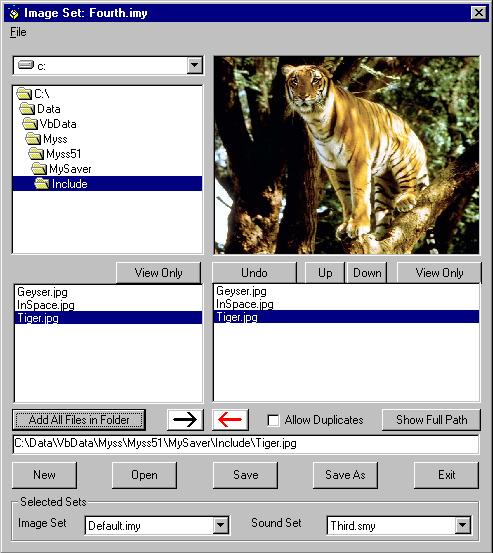
Image Sets: Each Image Set contains the path to each file, therefore you can include files from anywhere on your system. They do not need to be in the same folder.
"Drive Box" Sets the drive on your system.
"Folders" Sets the folder on your system. Double click a folder to make it current.
"File Box" displays the files with valid image extensions in the current folder. Double click a file to include it in the current set. If the file is a valid image file, double click will also display it in the Image Display Box at the top right. The full path will be shown in the message box below. If it is not a valid image file, it will not be added to the set, it will not be displayed and an error message will show in the message box.
"Image Display" The selected image file is displayed here.
"Included Files" This shows the image files in the current set. Double click a file to remove it from the set. See Undo below.
"Message Box" This shows the path of the selected image file or any messages that are necessary.
"Selected Sets" Select the Image and/or Sound Sets to be used by My Screen Saver.
"Image Set" Select the Image set to be used by My Screen Saver.
"Sound Set" Select the Sound set to be used by My Screen Saver.
Go to Screen Shot
"View Only (A)" Displays the highlighted File Box file in the Image Display Box.
"Undo" When active, restores the last file removed from the current Image Set. Only one level of Undo is available.
"Up" In the Included Files Box, moves the highlighted file up one position. If you select "In Order" on the Display Tab, the images are displayed in the order of the set. You set this order by using the Up and Down buttons.
"Down" In the Included Files Box, moves the highlighted file down one position. If you select "In Order" on the Display Tab, the images are displayed in the order of the set. You set this order by using the Up and Down buttons.
"View Only (B)" Displays the highlighted Included File file in the Image Display Box. The file path will be displayed in the Message Box. If the file is missing or corrupt, it will not be displayed and an error message will be shown in the Message Box.
"Add All" Adds all of the valid image files from the File Box to the current set. Any message displayed will refer to the last file.
"Arrow Right" This is the arrow on the LEFT which points RIGHT. This adds the highlighted File Box file to the current set. If the file is a valid image file, it will also be displayed in the Image Display Box at the top right. The full path will be shown in the message box. If it is not a valid image file, it will not be added to the set, it will not be displayed and an error message will show in the Message Box.
"Arrow Left" This is the arrow on the RIGHT which points LEFT. This removes the Included File file from the current set. This will also make the Undo button available.
"Show Full Path" This will toggle between showing the file name only and the full path of the files in the Included File Box. If the path is too long, you may not be able to see the entire path. In this case, simply highlight the file and the path will be shown in the Message Box.
"Allow Duplicates" When checked you will be able to select the same file more than once. The default is that duplicates cannot be added to the Image Set.
Go to Screen Shot
"New" This clears the current data for a new Image Set. If you have done anything with the current data since it was last saved, you will be prompted to save it before it clears the current data.
"Open" This presents a selection box with all available Image Sets on your system. Select the set you want and click OK, or double click the file. This should include a Default set that comes with My Screen Saver. If you have done anything with the current data since it was last saved, you will be prompted to save it before it prompts you for the file.
"Save" Saves the current Image Set. If it is not yet named, it is the same as "Save As".
"Save As" This presents a selection box with all available Image Sets on your system. Select the set you want and click OK, or double click the file, or type a name for the set. If you select a set that is different than the current set it will prompt for confirmation to overwrite the old set.
"Exit" This exits Image edit. If you have done anything with the current data since it was last saved, you will be prompted to save it.
Go to Screen Shot
| Downloads | MySS Info | ToolKit Info | Register | Home | Features |
Copyright 1999 John Castelluccio