CONTROLS / CONFIGURATION
There are as many different controller configurations as there are D3 pilots! The preferred combination for D3 however is a joystick and keyboard mix. Most pilots use the keyboard for movement (thrust forwards, backwards and afterburner) and the joystick to aim, slide, bank and fire.
It needs to be heavily stressed that to compete successfully online in descent 3 you will need a very good quality joystick with the following properties:
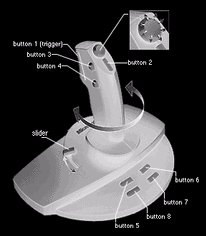
- High sensitivity and accuracy when aiming close to the center-point of the joystick
- Twist grip which provides support for ship banking
- 8-way Hat switch for sliding
- Solid construction and good weight
The stick of choice at PXO seems to be the now discontinued Microsoft Sidewinder 3D Pro. This may be because a lot of pilots have been playing for 5 years or more and started out with a 3D Pro! Regardless, the 3D Pro is an excellent stick for D3. Finding a lot of favour too is the Microsoft Sidewinder Precision Pro. I have also heard good reports about the Saitek Cyborg stick.
The more intuitive the setup, the better you will play. Having the 8-way Hat switch on the joystick, and using your thumb to slide while moving (tri-chording) should become second nature. It feels pretty good to use the Hat to slide this way. There are some very advanced flying maneuvers that are trickier to perform with the Hat than with the KB, but generally it is a superb and intuitive method.
One important point about the setup if you use the hat to slide with, do not have it set so that you need to move your thumb off the Hat switch to fire a missile! This would mean you would lose slide control when you need it most! For that reason I use the Space Bar to launch missiles.
The only problem with this is when you are chatting with someone in a game. If you forget to hit the F8 key you will launch a missile after typing your first word! It is either a waste of a missile, or commonly a "type kill" as you will often be right in front of someone while chatting! Be wary of this! Don't sit directly in the firing line of an opponent when chatting! Even this may not save you from the unexpectedly launched smart, homer, mega, frag or mortar! BACK TO THE TOP
SETTING IT ALL UP
For the new pilot there is a bewildering array of controls and settings in Descent 3. In fact, the manual alone contains 80 pages! We won't try to tell you how to play the game or what setup you should use. However, your control setup should allow you to:
- Slide while firing primary and secondary weapons simultaneously
- Select primary and secondary weapons while dogfighting - without having to stop moving or interrupt your flying.
- Slide in all 8 directions (combinations up up/left, right/down etc.)
- Cycle the rearview options easily
- deliver "audio taunts" in battle!
Your configuration should NOT allow
- sliding both left and right (or up and down) at the same time
- any uncommanded control inputs
COMMON COMBINATIONS AND CONFIGURATIONS
Joystick & Keyboard - The most common of all, but with major variations! The more stuff you have on your joystick the less you have to use the KB. This is the combination Mobius uses: keyboard to move forwards, backwards and afterburn, to launch missiles and to play taunts. Primary fire, aiming, sliding and banking on the Joystick and everything else by voice control in GAME COMMANDER.
Xeon uses the numeric keypad to move and slide, and the Hat switch to cycle weapons. An unusual setup that takes great skill to use!
Mouse & Keyboard - The "Mouselookers" are at a distinct disadvantage in D3 online play. By default the "mouselook" function is disabled in the server setup! Quake players might prefer to play this way, but very few games allow it. Because you can turn the ship as fast as you can move the mouse, it is a major advantage and is usually banned.
Keyboard Only - For masochists only! There's nothing intuitive about playing with a keyboard only. Extremely difficult to do effectively, I have played a few pilots who use keyboard only. None of them have beaten me. :-)


