HOME    MY LIFE    MY SAY    MY PASSION    MY WORK    CONTACT ME    LINKS AND CREDITS   


Key Concepts

    There are basically 2 Address Books available to the user; the local address book and the public address book. Not only the location of these files are different, they also serve different functions from each other.

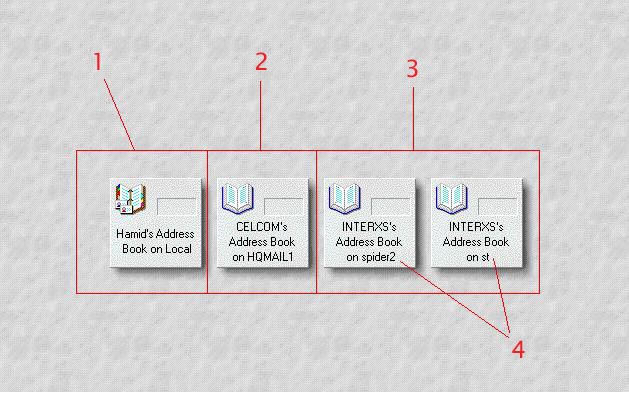
Diagram 1

Diagram 1, Step 1 - A Personal Address
Book will have a different graphical icon from the Public Address Book.

Diagram 1, Step 2 - Public Address
Books may appear similar to each other. Upon closer inspection, different domain would have different textual icon.

Diagram 1, Step 3 - Public Address
Books may appear similar. They may even have a similar Domain.

Diagram 1, Step 4 - Servers
However, what differentiates between the two Address Books is the server on which they reside.

Table 1 Hamid's Address Book on Local CELCOM's Address Book on HQMAIL1 INTERXS's Address Book on spider2 INTERXS's Address Book on st
Type Personal Address Book Public Address Book ( Domino Directory ) Public Address Book ( Domino Directory ) Public Address Book ( Domino Directory )
Domain Local ( Your Own PC ) CELCOM INTERXS INTERXS
Where does it reside? Local ( Your Own PC ) HQMAIL1 ( Server ) spider2 ( Server ) st ( Server )

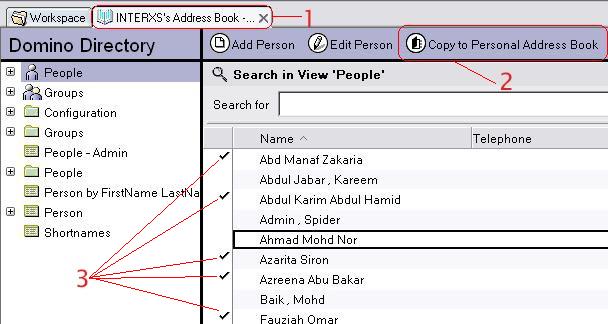
How to copy entries from the Public Address Book to Local Address Book?

Diagram 2

Known Issues


Address Book

Archive

Delegation

Replication

Templates

Renaming Issue


ELATED PageKits © 2002 ELATED.com/PageKits.com