
| HOME | MY LIFE | MY SAY | MY PASSION | MY WORK | CONTACT ME | LINKS AND CREDITS |
 | ||||||||||||||||||||||||
 |
LOTUS NOTES / DOMINO - Renaming Issue
You can rename a user with
the Administration Process by choosing People -
Rename from the tools pane of the Domino Administrator. The
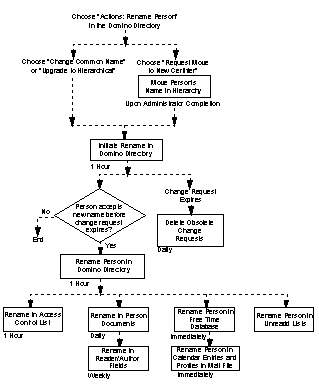
following flowchart shows the sequence of Administration Process requests
that occur when you rename a person in the
Domino Directory. (Boxes represent requests.) The timing shown for each
request is the default, which you can customize through the Server Tasks -
Administration Process section of the Server document. Triggered by: Choosing Actions - Rename Person then Request Move to New Certifier in the Domino Directory or by choosing People - Rename from the tools pane of the Domino Administrator. Carried out on: The server from which you choose Actions - Complete Move. Carried out: When you choose Actions - Complete Move, in the Name Move Requests view of the Administration Requests database, to move a person's name to another hierarchy. Result: Approves the move and triggers the "Initiate rename in Domino Directory" request. Initiate rename in Domino Directory Triggered by: Choosing a rename action. Carried out on: The administration server for the Domino Directory. Carried out: According to the "Interval" setting for the Administration Process in the Server document. Result: Adds the new name, certificate, and change request to the Person document. Prompts the person to accept the new name upon next server authentication. Rename person in Domino Directory Triggered by: Person accessing a server and accepting the new name. Carried out on: The administration server for the Domino Directory. Carried out: According to the "Interval" setting for the Administration Process in the Server document. Result: Updates the person's name in the Domino Directory -- except for Person documents. Posts the "Rename in Person documents" and the "Rename person in Unread Lists" administration requests. Rename in Person documents Triggered by: Completion of the "Rename person in Domino Directory" request. Carried out on: The administration server for the Domino Directory. Carried out: According to the "Execute once a day requests at" setting for the Administration Process in the Server document. Result: Updates the name in Domino Directory Person documents. Rename person in unread list Triggered by: Completion of the "Rename person in Domino Directory" request. Carried out on: Each server in the domain. Carried out: According to the "Execute once a day requests at" setting for the Administration Process in the Server document. Result: Each server in the domain examines every database on the server and updates the person's name in any unread lists. Rename in Access Control List Triggered by: Completion of the "Rename person in Domino Directory" request. Carried out on: Each server in the domain. Carried out: According to the "Interval" setting for the Administration Process in the Server document. Result: Each server in the domain updates the person's name in ACLs of databases for which it is an administration server. Rename person in Free Time Database Triggered by: Completion of the "Rename person in Domino Directory" request. Carried out on: The person's home server. Carried out: Immediately Result: The person's name is changed in the Calendaring and Scheduling Free Time Database. Rename person in calendar entries and profiles in mail file Triggered by: Completion of the "Rename person in Free Time Database" request. Carried out on: The person's home server. Carried out: Immediately Result: The person's name is changed in their mail file's Calendar Profile and appointment documents. If the person's common name was changed and the common name is in the title of the mail file, the mail file title changes to reflect the new name. If the person is the "chair person" of any future meetings, the name is changed in those appointment documents. Rename in Reader / Author Fields Triggered by: Completion of the "Rename in Person documents" request on the administration server for the Domino Directory. Carried out on: Each server in the domain. Carried out: According to the "Delayed Request" setting for the Administration Process in the Server document. Result: Each server in the domain updates the person's name in Reader / Author fields of databases for which it is an administration server and that have the advanced ACL option "Modify all Reader / Author fields" selected. Delete Obsolete Change Requests Triggered by: Expiration of the period in which a person can accept a new name, by default 21 days. When you rename the person, you can change the expiration period. Carried out on: The administration server for the Domino Directory. Carried out: According to the "Execute once a day requests at" setting for the Administration Process in the Server document. Result: The Administration Process deletes the word "Pending" from the Change Request field from the Person document.
Timing for Rename a user request
* Before the Administration Process carries out a rename person request, the user whose name is being changed is prompted to accept the name change. If the user does not accept the name change within a specified period of time, or grace period, the name change request becomes an Obsolete Name Change and is entered in the Administration Requests database as a Delete Obsolete Name Change request. See also |
|
||||||||||||||||||||||
 | ||||||||||||||||||||||||
 | ||
|
Address Book Archive Delegation Replication Templates Renaming Issue |
|
 | ||
ELATED PageKits © 2002 ELATED.com/PageKits.com