
| Astro64th's Nintendo Gallery | home |
 |
| GAMECUBE CONTROLLERS |
The Nintendo GameCube controller is a drastic change from the Nintendo 64 controller. Although the N64 controller was quite unusual to begin with.
The N64 design was a 3-pronged controller, with the control stick in the middle prong, the control pad in the left prong and the buttons on the right. The buttons on the right side of the controller were A, C-Left, and C-Up on the top and B, C-Down and C-Right on the bottom. With the 4 C-Buttons together making 'C'.
The N64 also had two shoulder buttons, one on each side, L & R respectively. And the Start Button was in the middle of the controller. But what made the N64 controller most unique (Besides the Control Stick, which was a first back then) was the Z Button, that was located on the bottom of the middle prong. This button was often referred to as the 'trigger button' because it kinda felt like the trigger on a gun. Just as well, it was excellent for use in first-person shooters and other such games.
For the GameCube controller, Nintendo opted to go for a more traditional design. While still trying to remain intuitive.
The GameCube controller has 7 regular buttons. Not including start. Don't fret over the lack of buttons though, as Nintendo has a couple tricks up their sleeve.
The GameCube controller has 4 buttons on it's face (on the right side). In the middle is the big round A Button. To the right of the A Button, is the X Button. Above the A Button, is the Y Button. And to the (lower) left of the
A Button is a smaller, round B Button.
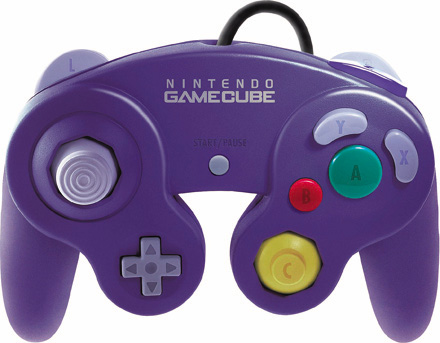
The reason for the design of the face buttons on the GameCube controller was to make it easier for people to pick up and play, without having to memerize where all the buttons are. You put your thumb on the central
A Button, and to access any other button, you simply move your finger above, to the right or to the left. It makes for a simple but effective design.
If you notice, both the X and Y Buttons are in the shape of a bean. Nintendo's original design, was going to have three bean shape buttons, surrounding the central A Button. With that design, all you would have to do is move your thumb to the right, left, or above the A Button, to reach all the other buttons. Unfortuneatly, people who tested out this design complained that it was to easy to accidently press the B Button while trying to press the A Button. Thus, Nintendo opted to change the B Button from it's bean shape to a smaller, circle shape.
To the lower left of the face buttons (Below the B Button) is a second control stick. This stick replaces the N64's C Buttons. And is labeled 'C'. The 'C Stick' was mainly designed to be used as a 'Camera Stick', to control the camera in games, kinda like the C Buttons did in most 3D N64 games. But, of course, the C Stick can be used for whatever the developer's want, but it makes a nice easy way to control the camera in games, if the developers decide to use it.
After much request, two buttons were added to the GameCube controller that weren't originally planned. One, was the Directional Pad. For some odd, reason, Nintendo at first, wasn't going to include a D-Pad on their controller, which would've been a BIG mistake, especially for fighting games. But, after much request, they decided it would be best to include one. The D-Pad on the GameCube controller is the same size as the
D-Pad on the Game Boy Color. For some reason, Nintendo decided to stay with the smaller D-Pad, instead of making it regular size.
The other button that was added later on, again after much request, was the Z Button. The Z Button is located below the Right Shoulder (R) Button. This button isn't made to be a primary button like all the others, but is instead supposed to be used kinda like a "select" button. For some reason though, the Z Button just feels really akward, and is kinda stiff. Nonetheless, most people are happy Nintendo even included it. The more buttons the better.
Last on the GameCube controller's buttons is the right and left shoulder buttons, that have been standard ever since the Super NES. The GameCube's L & R Buttons have a hidden secret though. If you press either of the buttons all the way down, they can be pressed one more time, making a "click". Simply dubbed the "digital click", this is a cool feature that kinda makes the L&R buttons two-in-one.
The GameCube controllers face buttons are also all at different heights. The Y Button is the highest, then the X Button, then the A Button. The A Button, R Button, and L Button are all also analog. The last thing about the GameCube controller is that it, like the Playstation Dual Shock controller, has a built in rumble. So, no need for a Rumble Pak anymore.
The controller actually had two other slight changes to it's original design. Both involved the control sticks. The regular Control Stick was given a grip to make sure it doesn't slide (Unlike the control sticks on Sony's Dual Shock controllers), and the C Stick was made a little fatter, so it was easier to get a grip on as well (I still think they should've added a grip or some kind of groove to it also though).
So far the feedback from people that have held the GameCube controller has been really, really positive. Most people say it is one of the most comfortable controllers they have ever felt, some people like it even better than Sony's Dual Shock 2 controller (Which has a reputation as being the best console controller).
The only gripe most people have about the controller is that the Z-Button is in an akward position and is kinda hard to reach. They say it feels weird and is kinda stiff.
However, the L and R buttons are said to be the best thing about the controller. The buttons have a groove for your fingers, and they are said to feel and fit just perfectly.
When the GameCube controller launches on November 18, it will come in four colors. Solid Indigo (Purple), Jet Black (Black), Spice (Orange), and Translucent Indigo.
The controller will carry an amazingly high MSRP of $34.99!
Besides the regular 1st party controllers from Nintendo, third party controllers will also be available. One of the cooler designs I have seen is one that keeps the original design of the face buttons that Nintendo was originally going to use; the A Button surrounded by three bean shape buttons. I think this is really cool because now we can test out Nintendo's original design for ourselves.
There will be many controllers available, not just third party developer's take at the standard controller, but steering wheels and things like that as well, as there is with any other console. Although third party controllers can be kind of nice to have around if you can't afford the insanely high price for a first-party controller, it is recommended to stick with Nintendo's controllers if possible, as first-party controllers are always of the highest quality. However, third-party controllers will always be there if you need them.
Below, I will list, and show pictures of if possible, some third party controllers that will be available at, or shortly after, launch of the Nintendo GameCube on November 18.
(Note: I'll update this part a little later)